
3D Viewer – 3D Model Viewer – Augmented Reality – Virtual Try On
Settings For Wordpress
A complete 3D model viewer for WordPress and WooCommerce with built-in augmented reality and webcam virtual try-on — no apps, no coding. Let shoppers rotate, zoom and pan your .glb/.gltf models, place products in their real-world space on Android and iOS, or try on glasses and caps with the built-in AtlasTryOn viewer. Everything runs in the browser: the camera feed never leaves the shopper’s device, there’s no app to install and no account to create. All free, with unlimited model uploads.
🚀 AtlasTryOn — virtual try-on for glasses & caps, built into the free plugin. Shoppers can try on glasses, sunglasses and hats online right from the product page using their webcam — no app downloads, no extra setup, and the camera never leaves their device.
🎁 14-day Pro free trial included for the full AtlasTryOn Pro experience — head-pose tracking, HD watermark-free snapshots, multi-face detection, live calibration. Start your free trial
Core features (Free):
- Rotate, zoom and pan 3D models on every product page (Google
<model-viewer>engine) - Mobile AR: floor + wall placement via Scene Viewer (Android) and AR Quick Look (iOS,
.usdz) - Unlimited model uploads — no caps on file count or size
- WooCommerce native: automatic “View in AR” button, simple + variable products
- Shortcode
[atlas_ar]+ Gutenberg block for posts/pages - QR code card for cross-device scanning
- AtlasTryOn webcam try-on for glasses, sunglasses, caps — unlimited products
- AI 3D model generator (text-to-model) — turn a text prompt into a 3D model using either Tripo3D or Meshy AI (admin-only; bring your own API key)
- Privacy by design — the camera feed stays on the shopper’s device; nothing is uploaded
Pro adds (separately installed plugin):
- Server-side compression for large model files (~80% size reduction)
- Interactive hotspots, real-world dimensions, image/model sliders in the metabox
- HD watermark-free try-on snapshots, head-pose tracking, multi-face detection, live calibration
- Bulk compression, analytics dashboard, multi-post-type AR, format conversion (FBX/OBJ/USDZ)
- AI image-to-model generation — turn a product photo into a 3D model with Tripo3D or Meshy AI
Pro pricing · Live demos · Video tutorials
3D Model Generation
How to Generate 3D Models with Tripo3D API
- Generate your API key from the Tripo3D API.
- Copy the API key.
- Go to the AtlasAR metabox in the post edit screen.
- Click on the Integration tab.
- Paste your API key in the Integration settings and save.
- Now, go back to the Edit Post page.
- In the AtlasAR metabox, enter your prompt for the 3D model.
- Click on the Generate Model button.
- A
task_idwill be generated. - Wait a few seconds while the model is being processed.
- A
- Once the model is generated, a 3D preview will appear on the right side.
- Click on the Save This Model button to save the generated model and update the post data.
- After saving, you can view the generated 3D model on the front end of your site.
How to Generate 3D Models with Meshy AI API
- Generate your API key from the Meshy AI API.
- Copy the API key.
- Go to the AtlasAR metabox in the post edit screen.
- Click on the Integration tab.
- Choose Meshy AI 3D as the API, paste your API key, and save.
- Now, go back to the Edit Post page and open the AtlasAR metabox.
- Pick a model type — text_to_model (write a text prompt) or image_to_model (paste a public image URL, or pick a product image).
- Click on the Generate Model button.
- A
task_idwill be generated. - Wait a few seconds while the model is being processed.
- A
- Once the model is generated, a 3D preview will appear on the right side.
- Click on the Save This Model button to save the generated model and update the post data.
- After saving, you can view the generated 3D model on the front end of your site.
How It Works – 3 Simple Steps
- Install & Activate:
- In your WordPress admin panel, go to Plugins Add New.
- Search for “AR VR 3D Model Try On”.
- Click “Install Now” and then “Activate.”
- Find the “AtlasAR” menu.
- Setup you basic settings.
- Upload Models:
- Navigate to a WordPress post eiditing screen
- Find the “AtlasAR” Metabox.
- Select the place where you want to display the 3D Model like Floor/Wall etc.
- Upload your Android Model:
.glb/.gltffile. - Upload your iOS Model:
.usdzfile. - Optionally, add a Poster Image (thumbnail) for the 3D model viewer.
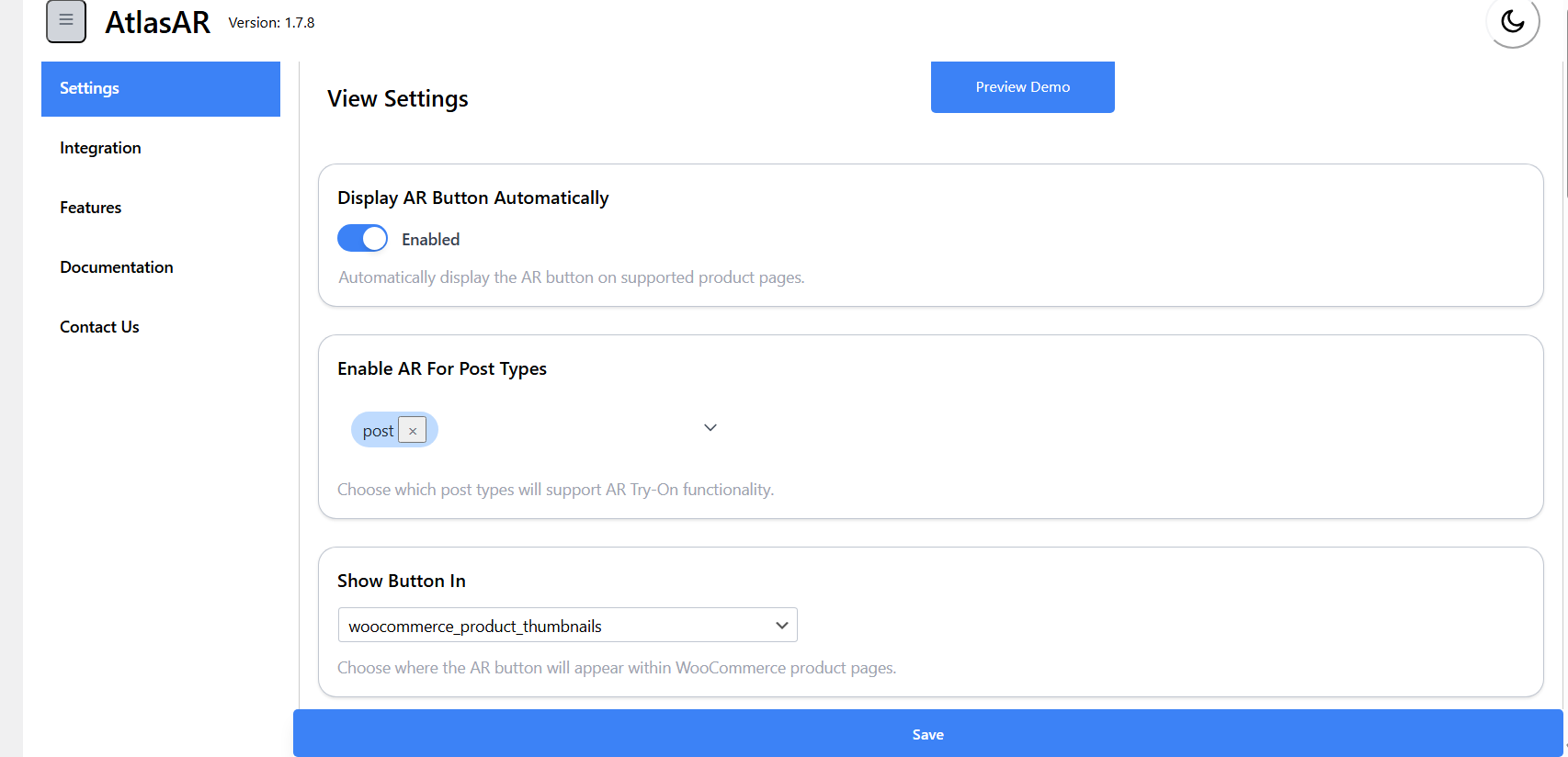
- If your site is WooCommerce Store then first go to settings page of the plugin. And Look “Enable AR For Post Types” by default If would be
post' change it toproduct’ and save.
- Display 3D Model Viewer:
- The “View in AR ” button is automatically placed on your WordPress Posts/WooCommerce product pages.
- For manual placement in other locations, you can use the shortcode:
[atlas_ar]. - Pro Users: Enable dimensions, hotspots, and sliders from the AtlasAR metabox settings.
Real-World 3D Viewer Applications
- 🪑 Furniture Stores: “Customers visualize sofas in their living rooms before buying.” Office Chair Demo
- 🖼️ Home Decor: “Preview wall art placement through phone camera.” Dining Armchair Demo
- 🛋️ Pro Feature – Dimensions: Show exact measurements in AR to answer “will it fit?” questions
- 🎨 Pro Feature – Configurators: Let customers customize furniture colors and materials before purchase
Competitive Advantages
Free Model Limits
– Our Plugin: Unlimited ⭐
– Others: Often 1–10 models
iOS AR Support
– Our Plugin: Full native .USDZ compatibility ⭐
– Others: Android-only or limited iOS support
WooCommerce Integration
– Our Plugin: Native, seamless implementation ⭐
– Others: May require add-ons or hacks
Model Compression
– Our Plugin: Automatic compression up to 70% savings ⭐
– Others: Manual compression required
Product Dimensions
– Our Plugin: Real-world size display in AR (Pro) ⭐
– Others: No dimension features
Pro Version Features
🎯 Upgrade to Pro and unlock powerful features that boost conversions and reduce returns!
👉 See Pro Pricing Plans
Available Now in Pro:
⭐ Dimensions Display:
* Show product measurements (length, width, height) directly in AR view
* Help customers answer “will it fit?” before buying
* Reduce returns caused by size mismatches
* Perfect for furniture, appliances, home decor
⭐ Interactive Hotspots:
* Add clickable information points on your 3D models
* Educate customers about product features, materials, care instructions
* Increase customer confidence and reduce support questions
* Perfect for complex products like furniture, electronics, jewelry
⭐ Product Configurators (Sliders):
* Let customers customize colors, materials, finishes, and options
* Increase engagement and time spent viewing products
* Higher average order value through personalization
* Perfect for furniture, fashion, custom products
⭐ Automatic Model Compression:
* Reduce 3D file sizes by up to 70% automatically
* Faster loading times = better user experience
* Uses industry-standard Draco geometry compression
* Basis Universal texture compression for optimal quality
* Keeps original files for backup
⭐ Per-Variation 3D Models:
* Upload different 3D models for each product variation (color, size, style)
* Critical for WooCommerce stores with variable products
* Automatic model switching when customers select variations
⭐ Glass Mode Virtual Try-On:
* Enable realistic virtual try-ons for eyewear and jewelry
* Face tracking for accurate placement
* Unique feature – no other AR plugin has this!
⭐ Multi-Model Scenes:
* Display multiple products together in AR
* Room planning and outfit builders
* Advanced configurators
⭐ AI Image-to-3D Generation:
* Turn a product photo directly into a 3D model — no prompt writing needed
* Works with both Tripo3D and Meshy AI (bring your own API key)
* Complements the free text-to-model generation available in the free version
Coming Soon in Pro:
🚀 Advanced Analytics Dashboard (Q1 2026):
* Track AR engagement, device types, placement attempts
* See which products perform best in AR
* Prove ROI with conversion tracking
* Integration with Google Analytics
🚀 Background Processing & Bulk Compression (Q2 2026):
* Compress large files in background (no upload delays)
* Bulk compress your entire product catalog with one click
* Queue system for processing multiple models
🚀 Desktop WebAR (Q3 2026):
* AR experiences on desktop browsers (no phone needed)
* Broader accessibility for all users
Pro Support & Updates:
- Priority email support (24-hour response time)
- Regular feature updates
- Early access to beta features
- Dedicated documentation
👉 Upgrade to Pro Now
💰 Starter Plan: Only $49.99/year – All Pro features for 1 site
Technical Specifications
- Supported 3D Formats:
.glb,.gltf(for Android/Web 3D),.usdz(for iOS AR Quick Look). - Mobile Device Requirements: Android 9.0+ with ARCore support, iOS 12+ with ARKit support.
- WooCommerce Compatibility: Version 3.0 and above.
- WordPress Compatibility: Version 5.0 and above.
- Performance: Models load asynchronously. Lazy loading implemented for archive pages to minimize performance impact. Optimized for mobile 3D rendering.
- Pro Compression: Draco geometry compression + Basis Universal texture compression for up to 70% file size reduction.
Start Your AR Journey Today
- Install the Free Version: Get started with unlimited 3D model uploads, no credit card needed.
- Upload Your First Model: Add a
.glb/.gltffile for Android/Web and a.usdzfile for iOS to a product. - Watch Engagement Soar: Provide interactive AR experiences.
- Upgrade to Pro: Unlock dimensions, hotspots, compression, and configurators to maximize conversions.
CHECK OUT OUR OTHER ADDONS 👑:
🔥 Text To Speech TTS Accessibility – Text To Speech TTS Accessibility is the most user-friendly Text-to-Speech tts plugin. Just install and automatically add a text to audio player to your WordPress site!.
🔥 Smart Local AI
🔥 Atlas AI Connector
External services
The third-party services below may be contacted. Each is used only when its feature is used. No visitor or product data is sent unless noted.
MediaPipe face tracking (Google / jsDelivr)
Powers the webcam Try-On feature. Only after a visitor clicks “Try It On”, the browser downloads the MediaPipe WASM runtime from cdn.jsdelivr.net and the face-landmark model from storage.googleapis.com, then caches them. A plain HTTPS GET for static assets — no site, user, or visitor data is sent. The camera feed stays on the visitor’s device.
jsDelivr — Terms: https://www.jsdelivr.com/terms Privacy: https://www.jsdelivr.com/terms/privacy-policy-jsdelivr-net
Google — Terms: https://policies.google.com/terms Privacy: https://policies.google.com/privacy
3D model generation (Tripo3D / Meshy AI)
Admin-only. Only after an administrator enters their own API key and clicks “Generate 3D Model” is a request sent — to api.tripo3d.ai or api.meshy.ai — containing the admin’s text prompt or image plus their API key. No site visitor data is sent.
– Tripo3D — API keys: https://platform.tripo3d.ai/api-keys, Terms: https://www.tripo3d.ai/terms, Privacy: https://www.tripo3d.ai/privacy
– Meshy AI — API keys: https://www.meshy.ai/settings/api, Terms: https://www.meshy.ai/terms-of-use, Privacy: https://www.meshy.ai/privacy-policy
AtlasAiDev tracker (track.atlasaidev.com, icanhazip.com)
Opt-in, off by default (revocable anytime). When enabled, sends usage telemetry — plugin/WordPress/PHP versions, site URL/name/language, active+inactive plugin counts, admin name and email, and the site’s outbound public IP (resolved via icanhazip.com) — so AtlasAiDev can prioritise improvements. No visitor or product data is sent.
AtlasAiDev — Terms: https://atlasaidev.com/terms-and-conditions/ Privacy: https://atlasaidev.com/privacy-policy/
icanhazip.com (Cloudflare) — Privacy: https://www.cloudflare.com/privacypolicy/
AtlasAiDev plugin catalog (raw.githubusercontent.com)
Fetches https://raw.githubusercontent.com/atlasaidev/plugins/main/plugins.json only when an admin opens the “Other AtlasAiDev Plugins” screen (cached 24h). No site or user data is sent beyond standard HTTP headers.
GitHub, Inc. — Terms: https://docs.github.com/en/site-policy/github-terms/github-terms-of-service Privacy: https://docs.github.com/en/site-policy/privacy-policies/github-general-privacy-statement
Bundled decoders (not an external service)
The DRACO, KTX2/Basis, and three.js Lottie decoders that <model-viewer> needs are bundled under public/js/vendor/decoders/ and served from your own site, so the plugin never fetches them from gstatic.com or cdn.jsdelivr.net.
Source code
The complete, unminified source (GPLv3) is on GitHub: https://github.com/azizulhasan/ar-vr-3d-model-try-on. The git tag matching each wp.org version is the exact source used for that release ZIP. Rebuild from a clean clone with composer install && npm install && npm run production.