

Simple Custom Code – Custom CSS, JS, and HTML, Visual CSS Customizer
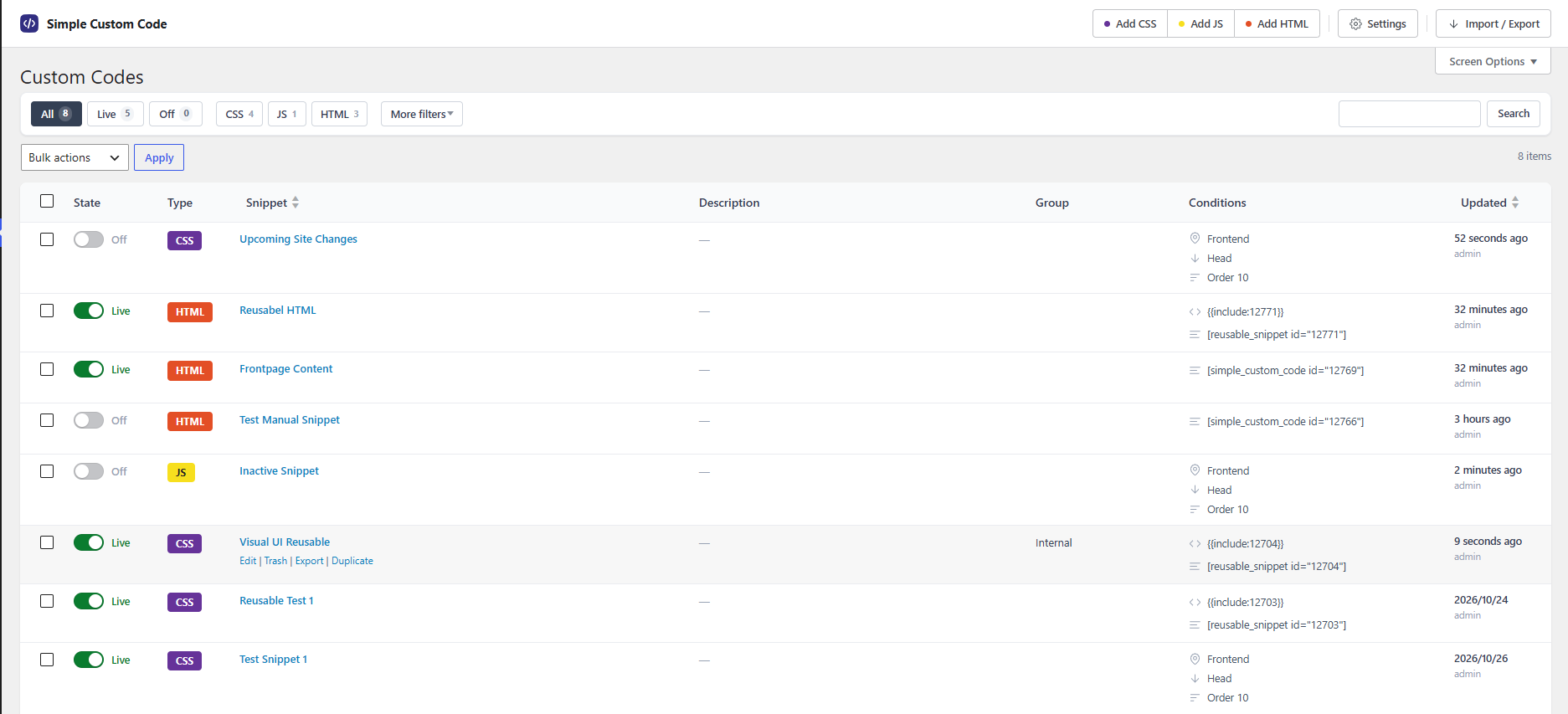
Plugin UI 1
Simple Custom Code – CSS, JS, and HTML lets you add custom CSS, JavaScript, and HTML to WordPress without touching theme files. Create and manage unlimited code snippets in one place. Every snippet is saved as a file in your uploads folder, so your code loads fast, caches well, and stays portable — no database clutter.
Choose the workflow that fits you. The live Visual CSS Customizer lets you point at any element on your page, click to select it, and style it with real-time visual controls. Or write code directly in the built-in editor with syntax highlighting, autocomplete, and error checking. Both paths produce clean, ready-to-use code.
Free features include:
- Unlimited CSS, JavaScript, and HTML snippets
- File-based storage for better performance and caching
- Live Visual CSS Customizer with real-time preview
- Gravity Forms Visual CSS Customizer
- Code editor with syntax highlighting and autocomplete
- Code beautifier and error detection
- AI code generation using your own OpenAI API key
- Load snippets on the frontend, admin, login page, or block editor
- Control load position and priority per snippet
- Role-based access control
- Snippet descriptions and groups
- Smart tags: page title, featured image, permalink
- Basic snippet health check
- See which snippets load on each page — view loaded snippets directly on your site
- Import and export single snippets or all snippets
- Import snippets from WPCode, Code Snippets, Header Footer Code Manager, and Simple Custom CSS and JS
Live Visual CSS Customizer
Create designs directly from your site’s frontend using the built-in Visual CSS Editor. Select any element visually, adjust fonts, colors, spacing, borders, and hover effects with live preview, and save when you are happy with the result.
Key features:
- Launch the CSS Customizer from the admin bar with one click
- Select elements visually without writing selectors
- Adjust fonts, colors, spacing, borders, transitions, and hover effects
- See changes in real time before saving
- Every visual change generates clean, optimized CSS
Gravity Forms Visual CSS Customizer
Style Gravity Forms with the dedicated live CSS customizer. Open it from the admin bar under CSS Customize > Gravity Forms and fine-tune form fields, labels, buttons, and layouts in real time. Match your forms to your brand without writing CSS by hand.
Unlimited CSS, JavaScript & HTML Snippets
Go beyond CSS. Create and manage unlimited snippets for CSS, JavaScript, and HTML from a single interface. Each snippet type is built for its purpose, so you can style, script, and structure your site exactly as you need.
Highlights:
- Create as many snippets as you need for CSS, JS, or HTML
- All snippets saved as external files for better caching and portability
- Activate or deactivate snippets anytime
- Load externally or inline
- Choose code position: head, after body, or footer
- Set priority levels to control load order
- Rename snippet files for better organization
Flexible Loading Locations
Control where your code loads. Unlike basic custom CSS plugins, Simple Custom Code gives you granular control over the context and location of each snippet:
- Frontend: load CSS, JS, or HTML on the public-facing side of your site
- Backend: inject code into the WordPress admin dashboard
- Login Page: target the WordPress login screen for branded login pages
- Block Editor: load code inside the Gutenberg block editor
You never load unnecessary code where it does not belong, keeping your site lean and fast.
Advanced Code Editor with Autocomplete & Syntax Highlighting
The built-in code editor is built for developers and beginners alike:
- Syntax highlighting: CSS, JavaScript, and HTML are color-coded for easy reading
- Real-time autocomplete: the editor suggests CSS properties, JavaScript functions, and WordPress hooks as you type
- Code beautifier: format messy code with one click
- Error detection: flags syntax issues before you save, so mistakes never reach your site
AI-Powered Code Generation
Describe what you need in plain English, and the AI generates ready-to-use CSS, JavaScript, or HTML. Whether it is a sticky header, a custom button style, or an admin tweak, tell the AI what you need and review the result in the editor before saving.
- Works with CSS, JavaScript, and HTML snippets
- Uses your own OpenAI API key, so you control your API usage and costs
- Generated code inserts directly into the editor for review and adjustment
Smart Plugin Settings
Total control over how and where your snippets load:
- Role-based access control: limit editor access to specific WordPress roles
- Cache-busting file versions: browsers always load the most recent changes
- Inline or external loading per snippet
- Adjust snippet priority, file naming, and execution location from the settings page
See Loaded Snippets on the Page
Check exactly which snippets are active on any page. The plugin lists the loaded snippets directly on your site so you can verify what is running, where, and in what order — without guessing or hunting through the admin.
Upgrade to Pro
The free version covers the essentials. The Pro upgrade adds advanced features for developers and agencies who need complete control over code delivery:
- Conditional loading: target snippets by URL, post type, user role, date, or WooCommerce cart and page conditions
- Version history: save a snapshot of every snippet change, compare versions side by side, and restore with one click
- Code minification: automatically minify CSS and JavaScript on save
- SCSS and Less compiler: write styles in SCSS or Less and compile to CSS automatically
- Reusable snippets: include one snippet inside another with {{include:ID}} or the [reusable_snippet] shortcode
- Expanded smart tags: user details, WooCommerce product and order data, ACF fields, dates, UTM parameters, and more
- WooCommerce positions: load code on cart, checkout, product, shop, and thank-you pages
- Cache mode: combine active snippets into a single cached file per page
- Priority technical support
Pro is built for performance-focused developers and agencies who need production-grade code management on WordPress. Learn more and upgrade at simplecustomcode.com
Who This Is For
This plugin helps anyone customize WordPress design and functionality quickly, safely, and without touching core files:
- Web developers who want full control over styling and scripting without modifying theme files
- Designers who use the Visual CSS Customizer to fine-tune typography, colors, and layouts without code
- Site owners who make small design adjustments or add scripts without hiring a developer
- Agencies and freelancers who manage multiple client sites and store custom code snippets efficiently
* WordPress beginners who learn CSS and JavaScript using visual controls, AI assistance, and instant preview
2.0.1
- Fixed PHP notices on WordPress 6.7+: textdomain loaded too early (
_load_textdomain_just_in_time) andregister_uninstall_hookcalled with an instance method. Textdomain loading and location registration are now deferred toinit, and the uninstall callback is static.
2.0
- Updated and improved the plugin UI
- Updated OpenAI connector with support for new models
- Added AI connectors for Claude, DeepSeek, and OpenRouter
- Added snippet descriptions option
- Added groups to organize snippets
- Added smart tags inside snippets. Free smart tags: page title, featured image, permalink
- Added basic snippet health check
- Added loaded snippets view — see which snippets load on each page directly on your site
- Added import and export for single snippets or all snippets
- Added snippets import from WPCode, Code Snippets, Header Footer Code Manager, and Simple Custom CSS and JS. Only snippets supported by this plugin can be imported.
1.4
- Updated OpenAI code generation models to support the latest GPT-5.5 model.
- Added manual display support with shortcodes for all snippet types.
- Added a device targeting option for HTML snippets, allowing display on desktop or mobile devices only.
- Added support for processing shortcodes inside HTML snippet content, including shortcodes from other plugins and Simple Custom Code.
1.3
- Plugin Renamed & Expanded: Simple Visual CSS Customizer is now Simple Custom Code – CSS, JS, and HTML, reflecting full support for CSS, JavaScript, and HTML snippets — not just CSS.
- Menu Renamed: The admin menu item “CSS Modifications” has been renamed to Custom Code to reflect the plugin’s expanded capabilities. All existing snippets and settings are preserved.
- Added unlimited JavaScript snippets with full editor support.
- Added unlimited HTML snippets with full editor support.
- Added new loading locations: Frontend, Backend (wp-admin), Login page, and Block Editor.
- Added real-time code autocomplete for CSS, JS, and HTML with WordPress hooks.
- Added built-in code beautifier for one-click formatting.
- Added syntax highlighting for CSS, JavaScript, and HTML.
- Added smart error detection and validation for cleaner, safer code.
- Added role-based access control to restrict snippet management by WordPress user role.
- Added AI-powered code generation (requires your own OpenAI API key) — describe what you need in plain English, get ready-to-use CSS, JS, or HTML.
1.2 (Simple Custom Code base)
- Added Visual CSS Customizer for real-time visual styling.
1.1
- Added Gravity Forms CSS live visual front-end customizer under “CSS Customize” Gravity Forms in admin bar.
- Increased editor height to utilize full screen height.
- Added option to enable file versioning for externally loaded files.
- Added option to load code right after the body opening tag.
1.0
- Initial public release of Simple Visual CSS Customizer (now Simple Custom Code – CSS, JS, and HTML).
- Live visual front-end customizer with “CSS Customize” admin bar entry.
- File-based CSS storage system to prevent database bloat.
- Advanced snippet controls: loading positions, URL conditions, priorities.
- Complete settings panel with role-based access control.