


Appointment Hour Booking – Booking Calendar
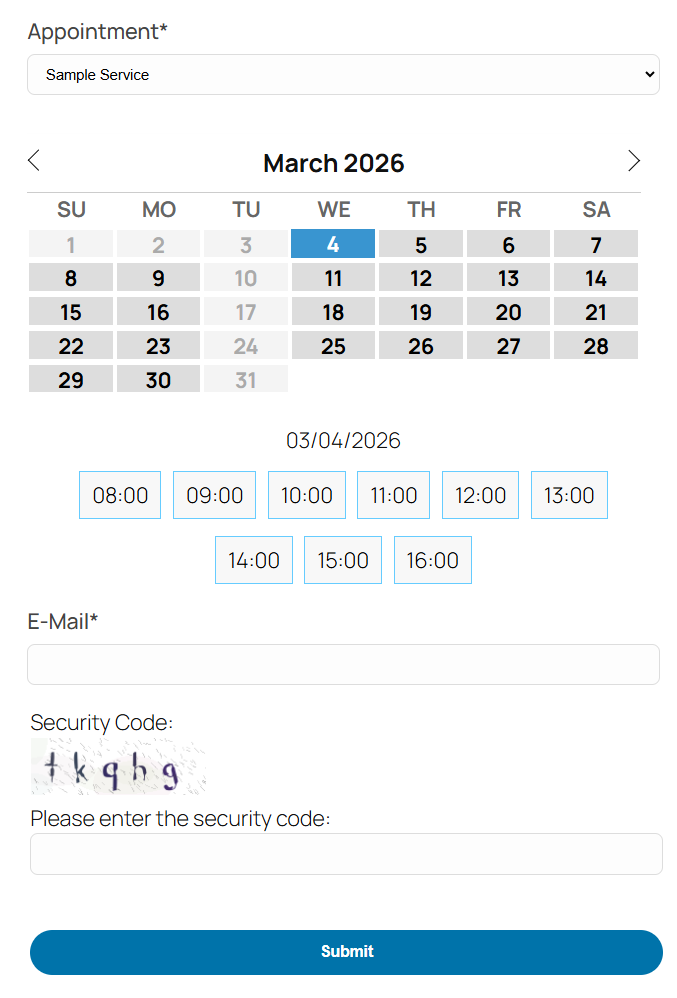
Appointment booking form.
Appointment Hour Booking is a WordPress plugin for creating booking forms for appointments with a start time and a defined duration over a schedule. The start time is visually selected by the end user from a set of start times calculated based on the “open” hours and service duration. The duration/schedule is defined in the “service” selected by the customer. Each calendar can have multiple services with different durations and prices.
This plugin is useful for different cases like booking medical services where services with different durations and prices may be available, personal training sessions, booking rooms for events, reserving language classes or other types of classes, and other types of service/resource bookings where start times are selected and availability is automatically managed using the defined service duration to avoid double-booking (the booked time is blocked once the booking is completed).
Main Features:
- Easy visual configuration of calendar data and schedules
- Working dates, invalid/holiday dates, and special dates can be defined
- Supports restriction of default, maximum, and minimum dates
- Open hours can be defined for each date
- Each calendar can have multiple services defined
- Each service can have its own price and duration
- Start times are calculated automatically based on the open hours and service duration
- Available times are managed automatically to avoid double-booking
- Multiple services can be selected in each booking
- Services can have multiple capacities
- Automatic price calculation
- Customizable email notifications for administrators and users
- Reply to bookings with AI assistance directly from the bookings list (free, no API key required)
- Form validation and built-in anti-spam captcha protection
- Manual and automatic CSV reports (configurable for new/unread submissions or complete active booking lists)
- iCal add-on with iCal export link and iCal file attached to emails
- Calendar available in 53+ languages
- Multiple date formats supported
- Blocks for Elementor and Gutenberg
- Multi-page calendars
- Printable appointments list
Features in commercial versions:
- Visual form builder for creating the booking form fields
- Booking form can be connected to payment processors (e.g., PayPal Standard, PayPal Pro, Stripe, Skrill, Authorize.net, TargetPay/iDEAL, Mollie/iDEAL, SagePay, Redsys)
- Payments are SCA ready (Strong Customer Authentication), compatible with the Payment Services Directive (PSD2 – EU)
- Add-ons for integration with external services: reCAPTCHA, Mailchimp, Salesforce, WooCommerce, and others
- Add-ons with additional features: appointment cancellation add-on, appointment reminders add-on, Clickatell and Twilio SMS add-ons, signature fields, iCal synchronization, Google Calendar API, Zoom Meetings, etc.
Appointment Hour Booking can be used for:
Booking services or resources: Define schedules, open hours, services, prices, and durations, and let the calendar plugin manage the schedule.
Sample cases: Medical services, personal training, resource allocation, booking rooms, classes, etc.
The services can have a maximum capacity (for example: the number of people who can book/attend the service at the same time). The default capacity is 1. If the service capacity has been set to 1, the time slot will be blocked for new bookings after receiving one booking. If the service capacity has been set to a greater number (for example: a service with a capacity of 10), the time slot will be blocked after filling the capacity (for example: after receiving bookings for a total of 10 people). This feature is described in detail at https://apphourbooking.dwbooster.com/blog/2019/01/24/bookings-for-multiple-persons/
AI-Assisted Email Replies
From the “Booking Orders” list, administrators can reply directly to customer bookings using the built-in reply modal. The modal includes a free AI assistant (requiring no API key or external account setup) that drafts replies based on the booking details and optional instructions, and logs sent replies directly in the booking record.
The Troubleshoot Area
Use the troubleshoot area if you are having problems with special or non-Latin characters. In most cases, changing the charset to UTF-8 through the option available in the troubleshoot area will solve the problem.
You can also use this area to change the script load method if the booking calendar isn’t appearing on the public website.
The Notification Emails
The notification emails with the appointment data entered in the booking form can be sent in “Plain Text” format (default) or in “HTML” format. If you select “HTML” format, be sure to use <br /> or <p> tags for line breaks in the text and use proper HTML formatting.
Exporting Appointments to CSV / Excel Files
The appointment data can be exported to a CSV file (Excel compatible) to manage the data in other applications. That option is available from the “Booking Orders” list; appointments can be filtered by date and by text so you can export only the needed appointments to the CSV file. Automatic email reports can also be configured to send either new/unread submissions or the complete active booking list for upcoming events.
Other Versions and Features
The free version published in this WordPress directory is a fully functional version for accepting appointments as indicated in the plugin description. There are also commercial versions with additional features, for example:
- Ability to process forms/appointments linked to payment processors (PayPal, Stripe, Skrill, …)
- Form builder for visual customization of the booking form
- Add-ons with multiple additional features
Payments processed through the plugin are SCA ready (Strong Customer Authentication), compatible with the Payment Services Directive (PSD2 – EU) that came into full effect on 14 September 2019.
Please note that the pro features aren’t advertised as part of the free plugin in the description shown in this WordPress directory. If you are interested in more information about the commercial features, visit the plugin’s page: https://apphourbooking.dwbooster.com/download