


AnyAPI – Send Orders to Any REST API, Webhook & Email for WooCommerce
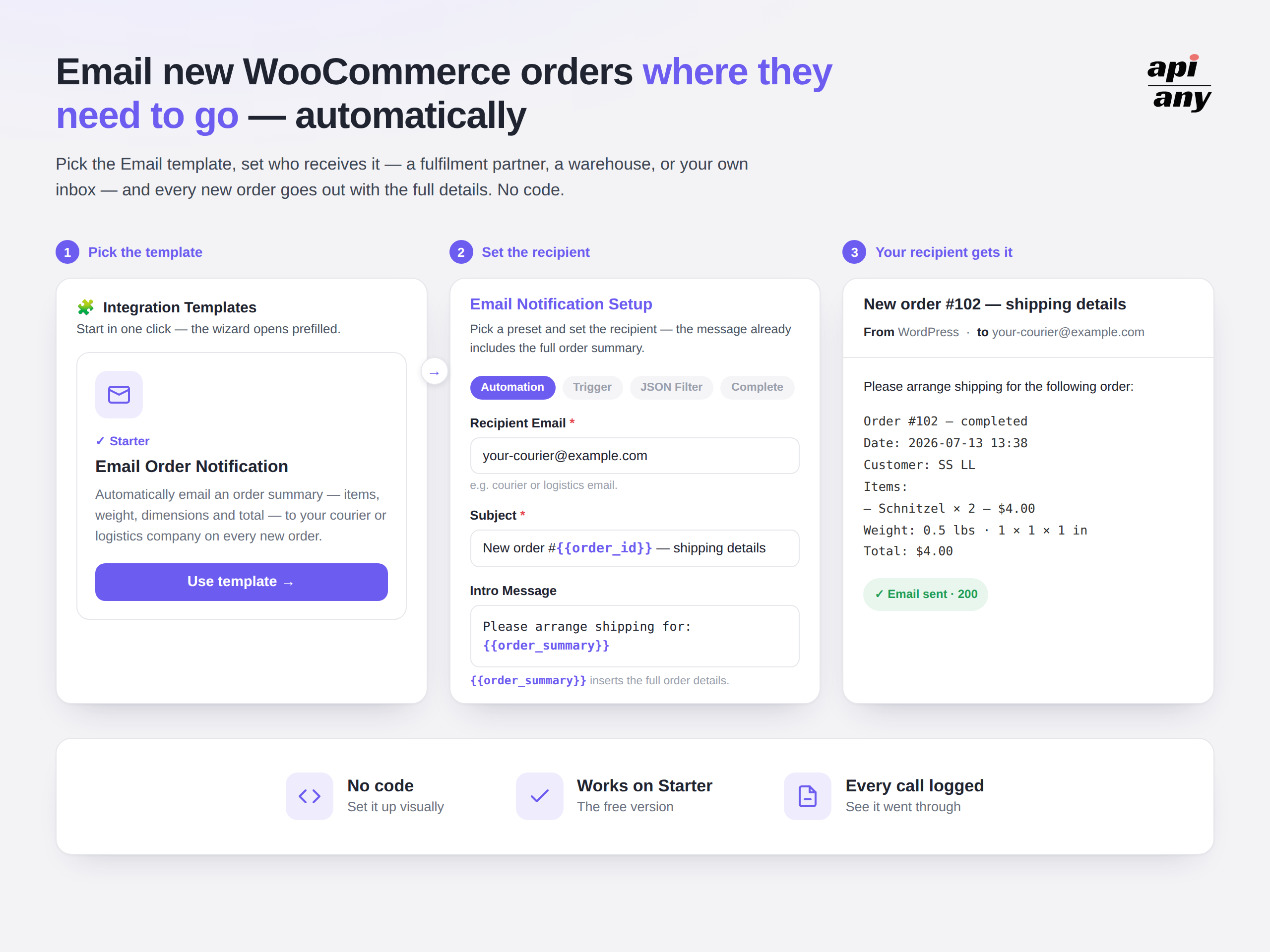
<strong>Integration Templates</strong> — Send order details by email in minutes, straight from a ready-made template
AnyAPI watches your WooCommerce orders. The moment one comes in, it sends the order details where they need to go — a REST API, a webhook, or an email address.
That replaces the copying by hand: new orders into your ERP or CRM, a ship notice to your fulfilment partner, a running record of the day’s orders, or an alert to the team the moment an order is paid.
Every call is logged, so you can see it arrived — and a temporary failure on the other end is retried on its own. No code, nothing to maintain.
🔗 Official Website | 📖 Documentation | 💬 Support | 💻 Source Code
Why AnyAPI?
AnyAPI does one thing and does it precisely: it takes the order data WooCommerce already has, shapes it the way the receiving system expects, and delivers it the moment the order event fires — then shows you that it arrived.
- Point it at a recipient and it runs — set who should receive the order, and from then on every new order goes out on its own.
- One order, wherever it needs to go — the same details can be sent to a REST API, a webhook, or an email address, so changing or adding a destination later isn’t a rebuild.
- It leaves the moment the order does — a new order, a payment, or a status you choose is enough to trigger it; you don’t press anything.
- You can see it arrived — every attempt is recorded with the response it got, shown in your dashboard, and a momentary failure on the other end is retried on its own.
Use Cases — What You Can Connect
Send every order into a Google Sheet
Keeping a spreadsheet of your orders usually means exporting a CSV every few days, or copying orders across by hand — and it falls out of date the moment the next order arrives. AnyAPI adds each order to a Google Sheet as it happens, so the sheet keeps itself current. Every order becomes a new row you can sort, filter, or hand to someone who doesn’t have access to WooCommerce — a bookkeeper, a supplier, a partner.
It works with a webhook and a short Google Apps Script, both covered step by step in the guide.
Send WooCommerce orders to Google Sheets
Tell your team the moment an order comes in
Nobody wants to sit watching the orders screen — but for a busy store, knowing an order landed the second it happens changes how fast you can act on it. AnyAPI posts each new order straight into a Slack channel, so the whole team sees it in the place they’re already working. Order number, total, and the details that matter, dropped in as it happens — no one has to log in to WooCommerce to find out.
It works with a Slack incoming webhook, set up in a few minutes.
Quick start: WooCommerce orders to Slack
Email the order details automatically
When an order reaches the status you choose, AnyAPI emails the full order details to whoever needs them — your fulfilment partner, your warehouse, your accountant, or your own inbox. Line items, quantities, totals, weight and dimensions are already laid out in the message, so the recipient can act on it without opening WooCommerce.
Choose the recipient, choose the order status, and it runs from the next order. No API, no setup research, and it works on the free version.
Get orders into the systems that run your business
The order doesn’t stop being useful once it’s in WooCommerce — your ERP still needs it for stock and invoicing, your CRM needs it against the customer’s record, and your fulfilment provider needs it to ship. Normally that means someone re-entering the same order into each one. AnyAPI sends it to them directly, the moment the order is placed, so the systems you already run stay in step with your store without anyone keying orders in twice.
If a system exposes a REST API or accepts a webhook, AnyAPI can reach it — whether it’s a large platform or an in-house tool built just for your business.
Works with almost anything that has an API
AnyAPI isn’t tied to a fixed list of services. If a system has a REST API or accepts a webhook, your orders can reach it — accounting tools, CRMs, ERPs, messaging apps, shipping and courier services, or an internal system your team built in-house. You’re not limited to a menu someone else decided on.
The same order can log itself to Google Sheets, post to Slack, or send a WhatsApp message through Woztell. It can also push order, inventory, and customer data into Oracle NetSuite, or adjust stock on a second WooCommerce store — from a simple spreadsheet log to a full ERP sync.
AnyAPI Lite: order integrations for WooCommerce
AnyAPI Lite builds on the free version with the controls a store needs once orders are flowing to real systems.
What it helps you tackle:
- Sending only the fields the receiving system expects, not the whole order.
- Finding an order that failed days or weeks ago, instead of only seeing the latest calls.
- Knowing how many of your integrations are succeeding.
- Reaching more than one recipient, on more of your order events.
Lite highlights:
- JSON Filter — choose exactly which order fields to send, rename them, or set fixed values.
- Full order log — keep every call you’ve ever made, and search your history by order ID, URL, or payload to open any call and see the exact data that was sent.
- More order triggers — fire on more of WooCommerce’s order events, not just the main three.
- Multiple email recipients — send the same order to several addresses.
- Direct email support — email help from Author.