


AnimFolio – Animated Portfolio & Resume Builder
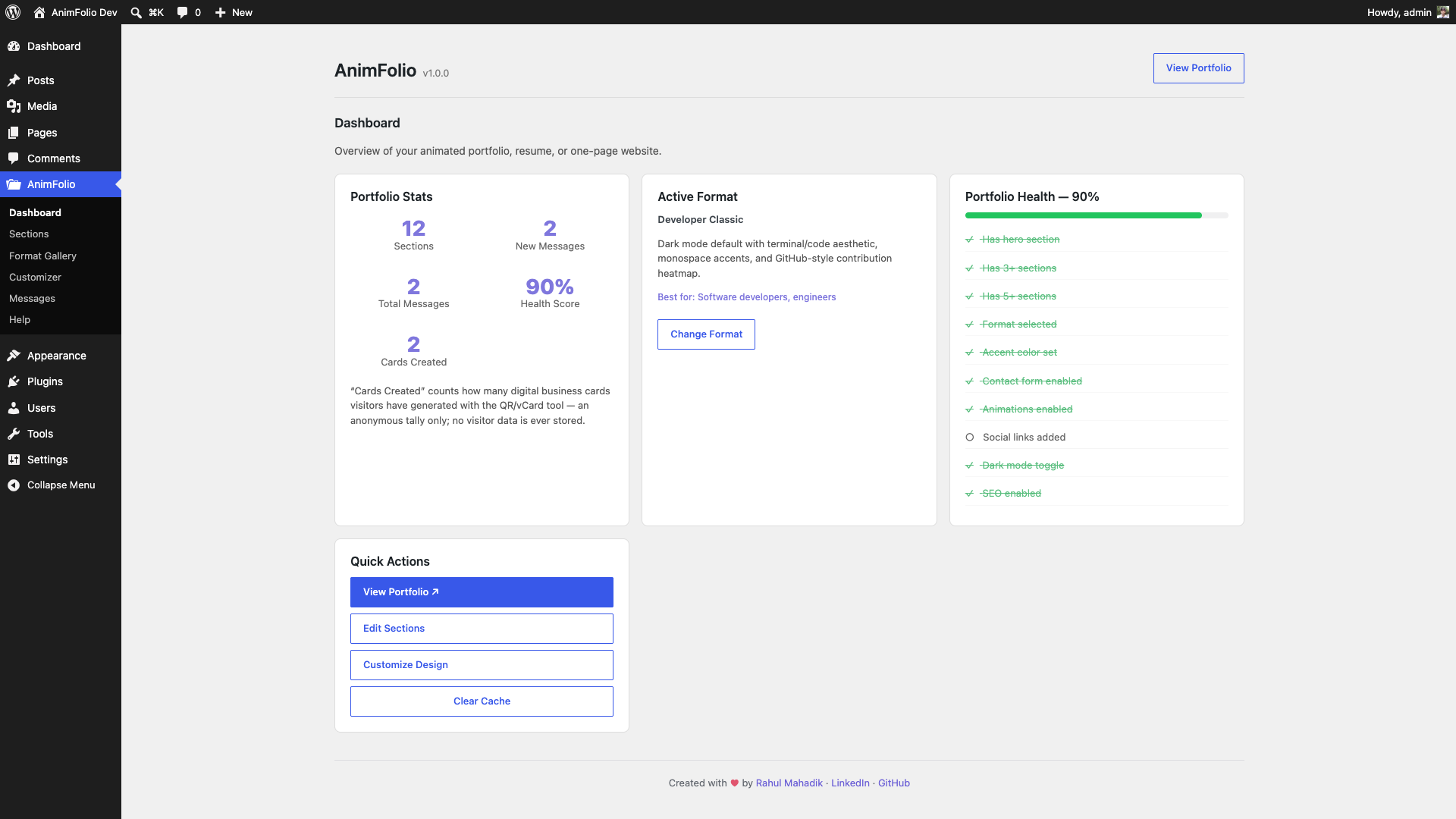
Admin Dashboard — quick stats, portfolio health score, and active-format overview
Build an animated portfolio that actually stands out — in minutes, for free. AnimFolio turns your name, work, and skills into a polished one-page site using 15 profession-specific formats, from a terminal-style developer portfolio to an RPG-gamified quest log. Pick a format, load demo content, edit it to be yours, and publish. No page builder, no theme lock-in, no code required.
👉 Live demo — try all 15 formats: https://rahulmahadik.com/animfolio
One-minute setup with AI + 1-click import. Export a ready-made JSON prompt, let ChatGPT or Claude fill it from your résumé or LinkedIn, then import it back in a single click — your entire portfolio populated instantly, with zero manual data entry.
Most portfolio plugins hand you a generic image grid. AnimFolio gives you a designed experience built for who you actually are — each format has its own layout, typography, motion, and color identity.
Perfect for: developers, designers, UI/UX and product people, photographers, writers, data scientists, founders, consultants, freelancers, students, and anyone who wants a fast, animated personal site or link-in-bio.
It’s not only a portfolio and resume builder. With the Custom HTML section — which accepts rich HTML and WordPress shortcodes — you can stack sections to assemble a complete animated single-page website for almost anything: a product or app landing page, a SaaS / startup site, a personal or small-business mini-site, a link-in-bio, an event or launch page, and more. Many people start with a portfolio and grow it into their main site — same animations, same admin, no theme lock-in.
What makes AnimFolio unique:
- 1-Minute Setup with AI + JSON Import — Export a ready-made JSON prompt, let ChatGPT or Claude fill it from your résumé or LinkedIn, then import it back in one click. Your entire portfolio is populated instantly — no manual data entry.
- 15 Role-Specific Formats — Not generic image grids. Developer, Designer, Freelancer, Agency, Photographer, Writer, Data Scientist, Product Manager, Startup Founder, Consultant, Student, Creative, Minimalist, Gamified RPG, and CLI Terminal.
- Built-in Scroll Animations — 12 lightweight animation modules (fade, parallax, typed text, counters, tilt, magnetic, custom cursor) built on IntersectionObserver + CSS. No animation framework or jQuery — fast and dependency-light.
- Gamified RPG Portfolio — Character sheet, skill tree, quest log, achievement badges, and XP bars for a playful, game-inspired portfolio.
- CLI Terminal Portfolio — Full command-prompt aesthetic with ASCII art, skill bars, and command output tables.
- One-Page Website Builder — The Custom HTML section accepts rich HTML and WordPress shortcodes, so you can build a full animated single-page site, not just a resume.
- Rich Projects — Embed YouTube/Vimeo videos (via WordPress oEmbed), multi-image galleries with a lightbox, and expandable case-study modals on each project.
- Resume Download — Add a downloadable resume/CV button to your hero (link to a PDF or any file).
- Skill Constellation — Display skills as an animated orbit/constellation (or bars, tags, dots).
- Blog Load More — The Blog section pulls your latest posts with a “Load More” button.
- QR Code + vCard — Client-side QR generation for business cards and print resumes.
- Dark/Light Mode — Smooth toggle with system preference detection.
- Complete Admin Panel — React-powered dashboard with drag-and-drop section builder, live preview customizer, format gallery, and contact submissions manager.
- 100% Free — No upsells, no premium version, no nag screens.
14 Section Types:
- Hero (name, title, typed text, CTAs)
- About (bio, photo, fun facts)
- Experience (timeline)
- Education (timeline)
- Skills (bar charts, categories)
- Projects (cards with tech stack, video embeds, image gallery + lightbox, case-study modals)
- Testimonials (quotes)
- Services (offerings, pricing)
- Achievements (badges, certifications)
- Stats (animated counters)
- Blog (auto-pulls WordPress posts)
- Contact (form with spam protection)
- Teaching (courses, workshops)
- Custom HTML
Admin Panel Features:
- Dashboard with portfolio health score
- Drag-and-drop section builder
- Per-section content editor with type-specific fields
- Format Gallery with 15 formats and one-click switching
- Customizer with 11 tabs (Format, Colors, Typography, Animations, Layout, Navigation, Social Links, QR / vCard, SEO, Import / Export, Advanced)
- Contact submissions viewer with detail modal, status management, CSV export
- Backup and restore system
- JSON import/export
External services
AnimFolio is self-contained and, by default, makes no external requests — all fonts, scripts, and styles are bundled locally and there is no tracking, analytics, or “phone home”. One optional integration can connect to a third-party service, and only when you explicitly enable it:
Google Fonts (optional, off by default)
When you set Customizer Typography Font Loading to “Google”, the visitor’s browser requests font stylesheets from fonts.googleapis.com and font files from fonts.gstatic.com so the chosen Google-hosted font can render. This happens only on pages that use such a font and only after you opt in; with the default “Local” setting no request is made. The request includes the requested font family names and the standard data any web request carries (IP address, user agent). See the Google Fonts FAQ (https://developers.google.com/fonts/faq) and Google Privacy Policy (https://policies.google.com/privacy).
Note: when you add a video URL to a Project, AnimFolio uses WordPress core’s built-in oEmbed (wp_oembed_get) to fetch the embed markup from the video provider you chose (e.g. YouTube/Vimeo); the result is cached locally so it is fetched at most once per URL. This uses WordPress core, not a service AnimFolio bundles.