


SlopStopper: AI Generative Content Obscurer
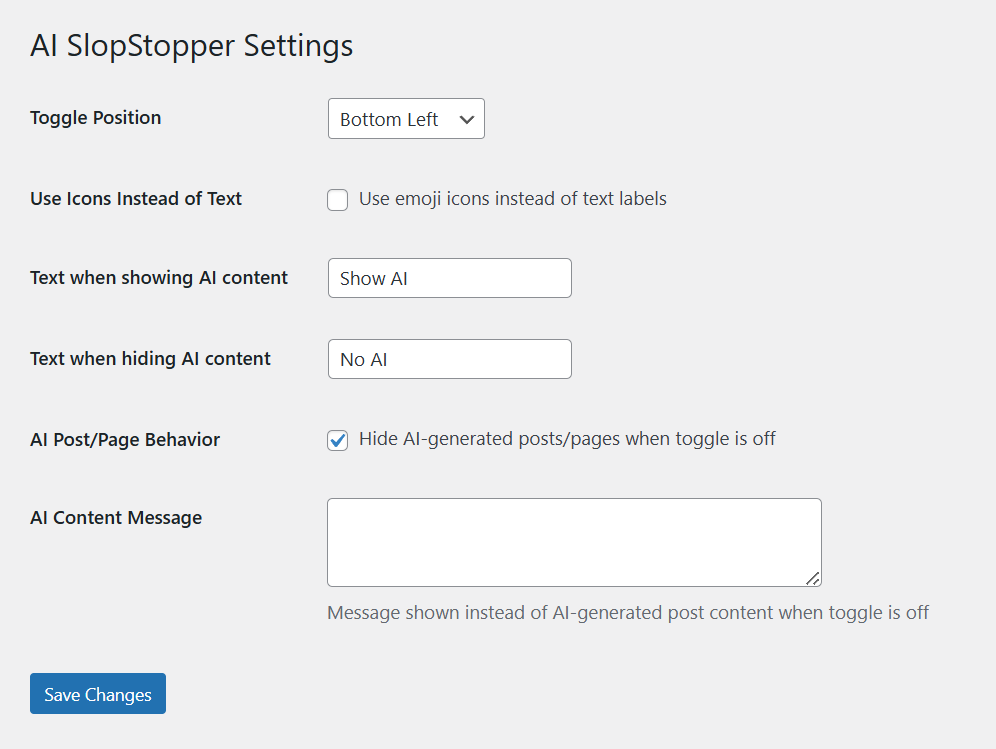
SlopStopper Settings page in the dashboard.
Give your users control over their AI slop intake. SlopStopper lets website owners identify AI-generated content and provides visitors with a simple toggle to show or hide it.
Some website owners find that a bit of AI assistance can be a helpful time-saver. Others use it to extend their verbal or artistic skills. However, many users are turned off by AI content on aesthetic or moral grounds.
SlopStopper provides websites with an on-off toggle for AI content, allowing site owners to employ AI as needed, better disclose its non-human provenance, and grant users the ability to scrub AI content from their user experience if they prefer.
Links
Plugin Features
- Visual toggle for generative content
- Supports multiple content types
- Administrative control panel
- Responsive design
- Persistent preferences
- Background image support
- Custom AI container block
- Customize or randomize obscuration filter
- Cache plugin compatible
Visual Toggle
SlopStopper adds a floating toggle switch on front end of your site. When clicked by a user, their localized display of the site will toggle between modes of showing or hiding your AI-generated content.
The switch is unobtrusive by default, becoming prominent when hovered over. The labels and position of the switch can be configured from the admin control panel in the settings section of your site’s backend.
Multiple Content Types
AI-generated content can be identified by image, post, page, or by a custom Gutenberg block type for sections of AI content within any post, page, or template.
AI Images
Compatible with all image formats!
SlopStopper adds an “AI generated” checkbox to the Details modal of every image in your Media Library. Checking the box will identify that image as being AI-generated.
When the user elects to hide AI-generated content, these images will be hidden behind a black overlay. Clicking the toggle to show AI content will remove the overlay, allowing the image to display.
Posts and Pages
SlopStopper adds a checkbox to the edit screen of every post and page. Checking the box will identify that post or page as being entirely AI-generated.
When the user elects to hide AI-generated content, the content of the page will be replaced by a notice that the content is AI generated. Clicking the toggle to show AI content will reveal the content of the post or page.
Other Content
SlopStopper adds a custom “AI Generated Content” block type that serves as a container for blocks containing any AI-generated sections within a post, page, or template. Any number of blocks can be placed within the “AI Generated Content” container.
When the user elects to hide AI-generated content, contained content will be hidden or replaced. Clicking the toggle will reveal the hidden content.
Admin Control Panel
SlopStopper adds an SlopStopper settings page under the Settings section of your WordPress backend. From here, you can set the position and labels of the toggle switch and an optional message to show when AI content has been hidden.
Responsive Design
SlopStopper uses responsive design techniques to adjust to displays on desktop and mobile devices.
User Preference Memory
SlopStopper remembers a user’s preference for showing or hiding the AI-generated content on your site, providing a consistent experience as the user navigates from page to page. The preference is saved to the user’s browser and is not accessible to the website owner or plugin developer.
Background Image Support
When an image is identified as AI-generated and used as a background image, the AI-generated image will be overlaid in black while the foregrounded content will not be affected unless also identified as AI-generated.
Custom Gutenberg Block
SlopStopper adds an “AI Generated Content” block to the Gutenberg editor. This block acts as a container for content in any blocks of AI content placed within it.
Customize Obscuration Filter
From the admin settings, slop images can be obscured with four basic filters: light and dark patterns, solid color, and a circuitry pattern. These can be customized with hue, saturation, and brightness to match the look of any website. The appearance can also be randomized and set to change daily.
Cache Plugin Compatibility
SlopStopper integrates with 15+ popular caching plugins including:
* WP-Optimize
* WP Rocket
* W3 Total Cache
* LiteSpeed Cache
* WP Super Cache
* And many more…
This ensures AI content changes are immediately reflected without manual cache clearing.
Installation Instructions
There are three methods to install this plugin.
1. Via WordPress dashboard
- Click on ‘Add New’ in the Plugins dashboard
- Search for ‘SlopStopper’
- Click ‘Install Now’ button
- Activate the plugin from the same page or from the Plugins dashboard
- You will now be able to identify the AI-generated content on your site (see below)
2. Via uploading the plugin to WordPress dashboard
- Download the plugin to your computer from (https://wordpress.org/plugins/ai-slopstopper/)
- Click on ‘Add New’ in the Plugins dashboard
- Click on ‘Upload Plugin’ button
- Select the zip file of the plugin that you have downloaded to your computer before
- Click ‘Install Now’
- Activate the plugin from the Plugins dashboard
- You will now be able to identify the AI-generated content on your site (see below)
3. Via FTP
- Download the plugin to your computer from (https://wordpress.org/plugins/ai-slopstopper/)
- Unzip the zip file, which will extract the ‘ai-slopstopper’ directory
- Upload the ‘ai-slopstopper’ directory to the /wp-content/plugins/ directory in your web space
- Activate the plugin from the Plugins dashboard
- You will now be able to identify the AI-generated content on your site (see below)
For Multisite installation
- Log in to your primary site and go to “My Sites” » “Network Admin” » “Plugins”
- Install the plugin following one of the above ways
- Network-activate the plugin
- You will now be able to identify the AI-generated content on your site (see below)
After Activation
Activating the plugin will enable you to identify the AI-generated content on your site and will allow visitors the option to show or to hide as they prefer.
- In your Media Library, check the “AI generated” checkbox on your AI-generated images.
- For AI-generated posts and pages, check the “AI generated” checkbox on each edit page.
- Wrap AI-generated content on posts, pages, and templates into “AI Generated Content” blocks in the Gutenberg editor.
- As you add new AI-generated content to your website, always remember to identify it accordingly.
- The plugin settings page can be accessed via “Dashboard” » “Settings” » “SlopStopper”
Pro Tip for Site Owners Using Caching
If you use a caching plugin, SlopStopper automatically clears relevant caches when you mark content as AI-generated. However, you may need to view the page while logged in to see changes immediately. Regular visitors will see the updates after the cache naturally expires or on their next visit.