

Share Buttons & AI-powered Summaries
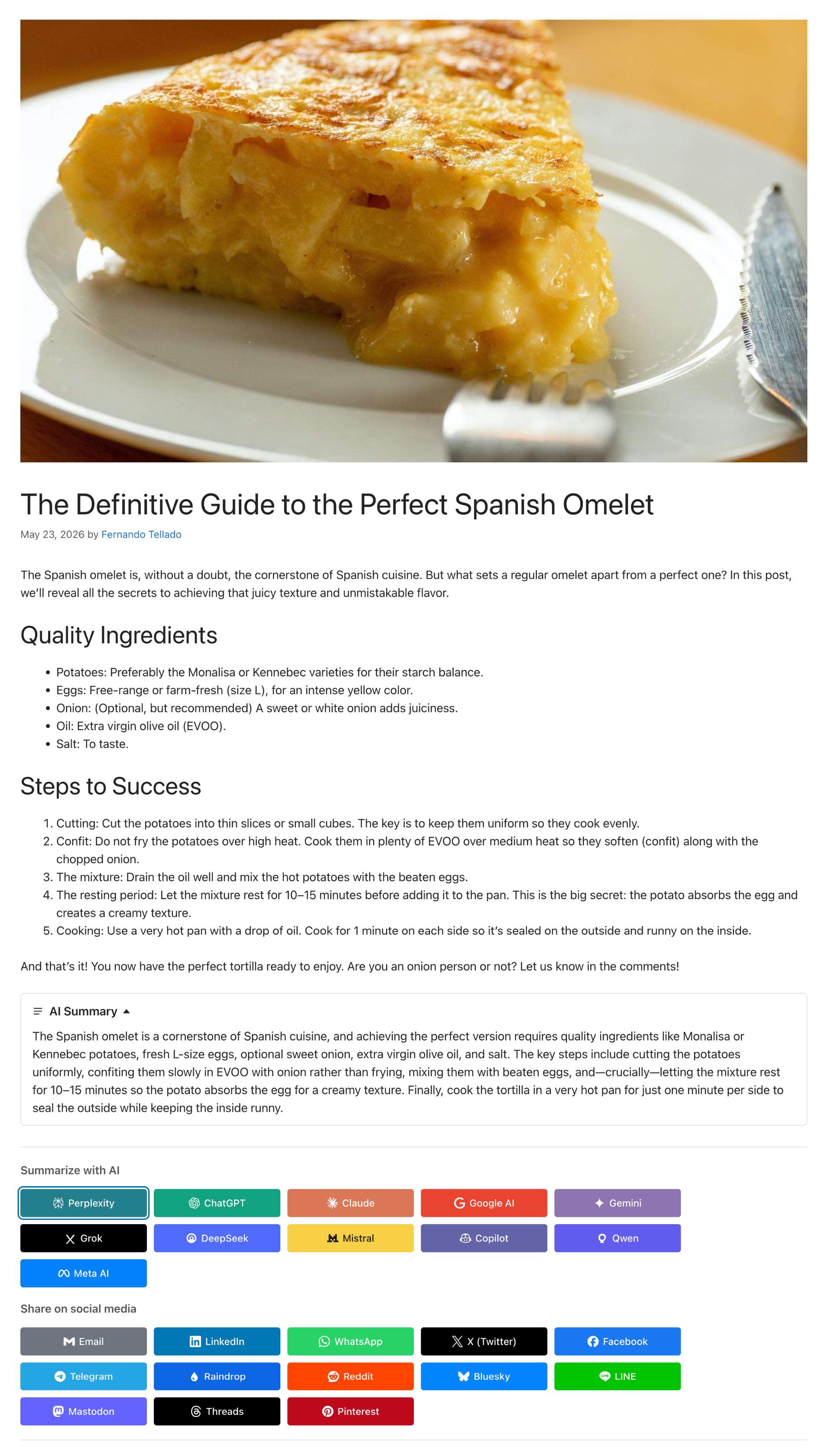
Inline AI summary collapsible block above the share and AI buttons on a post
Share Buttons & AI-powered Summaries turns every post into an AI-aware destination. It generates an inline AI summary readers can expand next to the share buttons, and offers one-click sharing to every major social network and the leading AI assistants.
Among the first plugins to integrate the native WordPress 7.0 AI Connectors API: configure your AI provider once in Settings > Connectors (OpenAI, Anthropic, Google) and the plugin reuses those credentials — no API keys to manage, no extra accounts.
Inline AI Summary
- Two-tier cascade: Level A uses the WordPress 7.0 AI Client; Level C is a built-in PHP extractive fallback with zero API cost on any WP 6.1+ install.
- Choose your AI model and mode: pick the provider and model used to generate summaries, or leave it on Automatic to use a fast, cost-effective model instead of the newest, most expensive one. Set how generation behaves too: AI with extractive fallback, AI only, extractive only, or disabled.
- Paragraph or bullet-list format: show the summary as prose (one paragraph per sentence) or as a concise bullet list, with configurable length (1-5 sentences or points).
- Collapsible inline block with native
<details>,data-nosnippetand Schema.orgCreativeWorkmicrodata so search engines treat it as derived content, not competition. - Editor controls in the block sidebar and the classic meta box: view, edit manually, regenerate on demand, hide per post (independently from the buttons).
- Visitor-facing “Generate AI summary” button for posts without a stored summary, restrictable to extractive-only or open to the AI Client.
- Async generation via WP-Cron.
[ayudawp_aiss_summary]shortcode also available.
Sharing
- Social networks: X (Twitter), LinkedIn, Facebook, Telegram, WhatsApp, Email, Raindrop, Reddit, Bluesky, LINE, Mastodon, Threads, Pinterest.
- AI assistants: Claude, ChatGPT, Google AI, Gemini, Grok, Perplexity, DeepSeek, Mistral, Copilot, Qwen, Meta AI — each opens with a citation-ready prompt linking back to your URL.
- Browser actions: a Copy link button and a native Share button that opens the device share sheet (reaching WhatsApp, Signal, Instagram, Messages or AirDrop), shown only where the browser supports it.
- Where they show: inline before or after the content, through the
[ayudawp_share_buttons]shortcode, or in a floating bar pinned to the left, the right or the bottom of the screen — on its own or alongside the inline block. - Compact on phones: optionally collapse the whole set behind a single Share button, or show a few buttons plus a More button, without touching the desktop layout.
- 6 visual styles, 4 sizes, custom colors, brand SVG icons, dark-mode auto-adaptation, drag-and-drop ordering, optional UTM tagging. SEO-friendly (
<a rel="nofollow">or<button>, auto-exclusion on noindex content for all major SEO plugins).
Analytics
- Click tracking per platform and per post, timeline chart with per-platform breakdown, period comparison (previous period, same period last year, custom range), CSV export.
- Dashboard widget with 7-day sparkline. VigIA cross-reference (clicks vs. AI crawler visits) when active. Redis/Memcached compatible.
Why use it?
- Cite your source naturally: when readers expand the summary or share to an AI assistant, your URL travels with the content.
- Reach every audience: full social spectrum plus 11 AI assistants in one place.
- Future-proof: built on WP 7.0 Connectors and a REST API ready for agentic clients.
External services
This plugin connects to third-party AI providers only when the inline AI Summary feature is enabled and an AI Connector is configured (or the WP AI Client is available). All other features — social and AI share buttons, click analytics, the extractive PHP fallback summary — run entirely on your own server and do not contact any external service.
AI Summary generation
When a post is saved (or when the editor / a visitor explicitly clicks “Regenerate” or “Generate AI summary”), the plugin uses the WordPress 7.0 AI Client (wp_ai_client_prompt()) to request a short summary from whichever provider you configured in Settings > Connectors. The plugin never stores your API keys — they are managed centrally by WordPress core.
What is sent:
- Post title (plain text)
- Post content (HTML stripped, up to ~3000 characters of plain text)
- A short instruction asking the provider to return a summary
What is not sent: API keys (managed by core Connectors), visitor IP addresses, user accounts, analytics data, or any other personal data of your readers.
Possible destinations (depending on which Connector your administrator activates):
- OpenAI — Terms of use · Privacy policy
- Anthropic — Terms of service · Privacy policy
- Google AI — Terms of service · Privacy policy
If you do not configure any Connector, or your WordPress version is below 7.0, the plugin falls back to the local PHP extractive summarizer and no external request is made.
How to opt out
- Set AI Summary generation to Disabled in the AI Summary tab of the plugin settings.
- Or choose Extractive only to keep summaries fully local — zero external requests, ever.
- Or choose AI only while leaving no Connector configured — no requests will be sent, and summaries simply won’t be generated.
- The visitor-facing “Generate AI summary” button is off by default; if enabled, you can additionally restrict it to the extractive PHP path so visitor clicks never reach an external provider.
Sharing buttons
The social and AI sharing buttons render as <a> / <button> elements that open the respective destination only when the visitor clicks them — your server does not contact those services. The plugin’s analytics endpoint that records button clicks runs locally on your own site.
Advanced Usage
Shortcode parameters
The [ayudawp_share_buttons] shortcode accepts several parameters:
buttons: Comma-separated list of buttons to display
– Example: [ayudawp_share_buttons buttons="claude,chatgpt,deepseek,twitter,mastodon"]
– Available: twitter, linkedin, facebook, telegram, whatsapp, email, raindrop, reddit, bluesky, line, mastodon, threads, pinterest, copy_link, web_share, claude, chatgpt, google_ai, gemini, grok, perplexity, deepseek, mistral, copilot, qwen, meta_ai
style: Visual style to use
– Example: [ayudawp_share_buttons style="outline"]
– Options: minimal, brand, outline, dark, custom, icons-only
size: Button size preset
– Example: [ayudawp_share_buttons size="compact"]
– Options: compact, normal, large, fluid
show_icons: Show icons with text (for non-icons-only styles)
– Example: [ayudawp_share_buttons show_icons="true" style="brand"]
– Options: true, false
icon_style: Icon corner style (for icons-only mode)
– Example: [ayudawp_share_buttons style="icons-only" icon_style="circular"]
– Options: circular, square
alignment: Button alignment
– Example: [ayudawp_share_buttons alignment="center"]
– Options: left, center
show_title: Show or hide the section title
– Example: [ayudawp_share_buttons show_title="false"]
– Options: true, false
title_text: Custom title text
– Example: [ayudawp_share_buttons title_text="Share this content"]
title_style: Title HTML element
– Example: [ayudawp_share_buttons title_style="h3"]
– Options: h3, h4, h5, h6, span
ai_title: Section title for AI buttons group
– Example: [ayudawp_share_buttons ai_title="Summarize with AI"]
social_title: Section title for social buttons group
– Example: [ayudawp_share_buttons social_title="Share on social media"]
Combined examples:
[ayudawp_share_buttons buttons="claude,deepseek,twitter" style="brand" show_icons="true"]

[ayudawp_share_buttons style="icons-only" icon_style="circular"]

[ayudawp_share_buttons show_title="true" title_text="Share or Summarize" title_style="h3"]

[ayudawp_share_buttons ai_title="Summarize with AI" social_title="Share" style="outline" show_icons="true"]

[ayudawp_share_buttons buttons="chatgpt,qwen,meta_ai,mastodon,threads" size="compact" style="brand"]

[ayudawp_share_buttons style="icons-only" icon_style="square" size="large"]

[ayudawp_share_buttons size="fluid" style="outline" show_icons="true"]
AI summary shortcode
The [ayudawp_aiss_summary] shortcode renders the AI-generated summary as a standalone collapsible block. Useful when you want to place the summary somewhere other than where the share buttons are auto-inserted, or when you have buttons disabled but still want to surface the summary.
post_id: Render the summary of a specific post
– Example: [ayudawp_aiss_summary post_id="123"]
– Defaults to the current post in the loop when omitted
The shortcode outputs nothing when the post has no stored summary, so it is safe to drop into templates without conditional wrappers.
CSS Customization Guide
The plugin uses CSS custom properties for all brand colors. You can override these in your theme to change any platform color globally:
Override platform colors:
.ayudawp-share-buttons {
–ayudawp-claude: #ff0000;
–ayudawp-chatgpt: #00ff00;
}
Main container classes:
– .ayudawp-share-buttons – Main wrapper container
– .ayudawp-buttons-container – Direct container for all buttons
– .ayudawp-title – Title element before buttons
– .ayudawp-section-title – Section title with extra top margin
– .ayudawp-aiss-centered – Applied when centered alignment is enabled
Button classes:
– .ayudawp-share-btn – Base class for all buttons (both <a> and <button> elements)
– .ayudawp-icon-wrapper – Container for button icons
– .ayudawp-button-text – Text label inside buttons
– .ayudawp-icon – SVG icon element
Style modifier classes:
– .brand – Brand colors style
– .outline – Outline style (brand-colored borders)
– .minimal – Minimal style
– .dark – Dark background style
– .custom – Custom colors style
– .icons-only – Icons-only mode
– .with-icons – Text buttons with icons
– .circular – Circular icon buttons
– .square – Square icon buttons
Size modifier classes:
– .size-compact – Compact button size
– .size-large – Large button size
– .size-fluid – Fluid width buttons
Platform-specific classes (on buttons):
– .twitter, .linkedin, .facebook, .telegram, .whatsapp
– .email, .raindrop, .reddit, .bluesky, .line
– .mastodon, .threads, .pinterest
– .claude, .chatgpt, .google-ai, .gemini, .grok
– .perplexity, .deepseek, .mistral, .copilot
– .qwen, .meta-ai
– .ai – Applied to all AI platform buttons
Example: Change Claude button color:
.ayudawp-share-buttons {
–ayudawp-claude: #your-color;
}
Example: Change all AI buttons background:
.ayudawp-share-buttons .ayudawp-share-btn.ai {
background: #f0f0f0;
}
Example: Hide specific button:
.ayudawp-share-btn.facebook {
display: none;
}
Customize or remove separator lines:
The main container has top and bottom border lines. You can hide either of them from the settings (Share Buttons Separator lines) with no code. CSS is only needed to replace them with your own style:
.ayudawp-share-buttons {
    border-top: 2px dashed #ccc;
    border-bottom: 2px dashed #ccc;
}
Important notes:
– The use of !important is no longer needed for most overrides
– Use CSS custom properties to change brand colors cleanly
– Test on both desktop and mobile viewports
– Icons-only buttons have fixed dimensions (44px default, 36px compact, 54px large)
Technical Details
System requirements
- WordPress 6.1 or higher (7.0+ for AI-generated summaries)
- PHP 7.4 or higher (compatible up to PHP 8.4)
- Theme compatible with wp_head() and wp_footer()
Performance features
- Modular file structure for maximum efficiency
- Selective loading of resources (CSS/JS only where buttons display)
- No external dependencies: the front end script is plain JavaScript and does not load jQuery
- The floating bar ships its CSS and JS as separate files, loaded only where the bar is shown
- Optimized CSS with custom properties and minimal specificity
- Lightweight SVG icons (under 1KB each)
- Minimal database impact: analytics queries are cached (5 min) and compatible with persistent object cache (Redis, Memcached)
- Smart responsive layouts
- REST API for lightweight analytics data retrieval
Developer features
- Clean, documented code
- WordPress coding standards compliant
- Hook-based architecture
- Modular class structure in /includes folder
- Extensible icon system using Simple Icons
- Translation ready
- Comprehensive shortcode API
- SEO-friendly markup options
- Post meta for individual exclusions
- Centralized platform color definitions
- Filters to extend the 2.5.0 features:
ayudawp_aiss_floating_bar_buttons(which buttons the bar shows),ayudawp_aiss_show_floating_bar(whether it renders on a given request),ayudawp_aiss_utm_args(the campaign parameters added to a shared link) andayudawp_aiss_trusted_proxies(which addresses may set the forwarding header behind a CDN or load balancer)
Support
Need private support or custom development?
Do you need one-on-one help, priority troubleshooting, or a custom feature, integration, or tweak built specifically for your site? I offer private support and custom development. Just contact me and tell me what you need.
Need help or have suggestions?
Love the plugin? Please leave us a 5-star review and help spread the word!
About AyudaWP
We are specialists in WordPress security, SEO, AI and performance optimization plugins. We create tools that solve real problems for WordPress site owners while maintaining the highest coding standards and accessibility requirements.