


AgeOnce Age Verification for WooCommerce
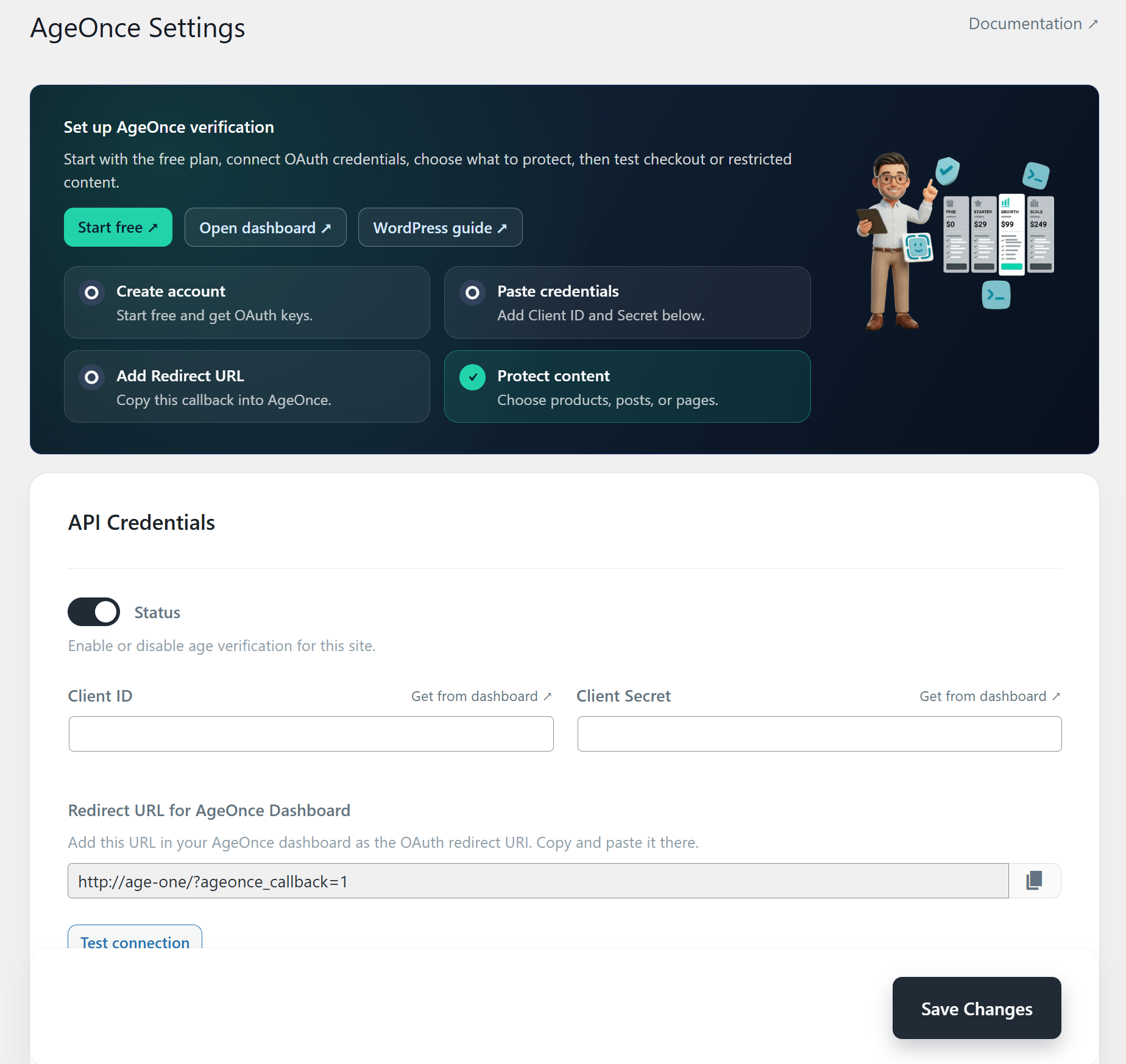
AgeOnce settings dashboard with setup checklist, OAuth credentials, redirect URL, test connection, and first-run test guidance.
Privacy-first age verification for WooCommerce and WordPress. WooCommerce has no built-in official age gate — AgeOnce adds real checks at checkout, optional customer signup on My Account, and restricted content, without archiving customer IDs or face images on your server. Your site keeps the verification outcome and an Audit ID. Start free with 100 verifications per month, no credit card required.
Full setup guide (video, install, free plan): WordPress age verification on AgeOnce.com
See how it works
About 90 seconds: install, connect credentials, set product rules, verify at checkout, then review order status and the AgeOnce audit log.
Use it for alcohol, tobacco, vaping, cannabis, adult content, supplements, events, memberships, or any other WordPress content that should be shown only after age verification.
Instead of relying on a simple “Are you 18?” popup, AgeOnce sends the visitor through a dedicated verification flow and then returns them to your store. The plugin can block WooCommerce checkout until verification is complete, optionally require age verification before customers create a store account on My Account, protect selected posts or pages, and record verification details on WooCommerce orders and new customer accounts.
Age assurance is now a legal requirement in many markets — the UK Online Safety Act, US state age-verification laws, the EU Digital Services Act, and FDA PACT rules for tobacco and vape all expect real checks rather than a self-declared age box. AgeOnce gives you a workflow you can show an auditor while keeping data collection to a minimum.
You can start with the AgeOnce free plan. No credit card is required for the free tier, so you can install the plugin, connect your site, and test the full WooCommerce checkout, optional signup gate, or content restriction flow before upgrading.
Why stores use AgeOnce
- Protect checkout for restricted products – Require age verification only when the cart contains products or categories that need it.
- Optional store signup age gate – Require age verification before guests can create a WooCommerce customer account on My Account (off by default; configurable 16+/18+/21+).
- Avoid blanket age gates – Keep normal products and public content open while gating only the items that require verification.
- Support 16+, 18+, and 21+ rules – Configure different minimum ages for different product categories, tags, posts, pages, or custom post types.
- Keep proof on orders and accounts – Store verification status, transaction ID, and timestamp on WooCommerce orders (and on new customer accounts when signup verification is enabled).
- Start free – Use the free AgeOnce plan to test real verification before moving to a paid plan.
- Use one verification flow across your site – The same AgeOnce verification can unlock checkout, signup, and protected content for guests and logged-in visitors.
- Respect privacy – The plugin only contacts AgeOnce when a visitor chooses to verify their age.
Features
- WooCommerce checkout age gate – Disable checkout until the customer completes age verification for restricted cart items.
- Optional WooCommerce customer signup age gate – On My Account registration, block create-account until AgeOnce verification (disabled by default; choose 16+, 18+, or 21+).
- Product-level control – Mark individual WooCommerce products as requiring age verification.
- Category and tag rules – Protect products, posts, pages, and custom post types by taxonomy.
- Manual content locking – Add an AgeOnce metabox to lock individual posts or pages regardless of taxonomy.
- Multiple age thresholds – Configure 16+, 18+, and 21+ rules from the same settings screen.
- Order and customer verification metadata – Save verification status, transaction ID, and verification time on WooCommerce orders; when signup gating is on, also save verification meta on the new customer.
- Guest-friendly verification – Keeps verification for guests after OAuth return via WooCommerce session and a short-lived cookie (24 hours).
- Secure OAuth flow – Uses state/nonce checks and server-to-server token exchange with AgeOnce.
- Content protection without WooCommerce – Gate posts, pages, and custom post types even if WooCommerce is not active.
Requirements
- WordPress 5.0 or higher
- WooCommerce 5.0 or higher (for checkout and customer signup protection)
- AgeOnce account with OAuth credentials (Client ID and Client Secret)
Getting Started
- Install and activate the plugin
- Open the AgeOnce WordPress setup guide (video + free plan)
- Create an account at AgeOnce and start with the free plan or choose a paid plan
- Go to AgeOnce Settings in the admin menu
- Copy the Redirect URL from WordPress into your AgeOnce dashboard
- Enter your Client ID and Client Secret in WordPress
- Click Test connection to confirm the OAuth setup
- Configure rules for WooCommerce products, categories, tags, posts, pages, or custom post types
- Optionally enable WooCommerce customer signup if you want age verification before store account creation
- Save changes and run one checkout, signup, or restricted content test
Docs: WordPress plugin documentation. Plans: AgeOnce pricing. Product page: wordpress-age-verification.
Privacy
This plugin sends data to the AgeOnce service (app.ageonce.com, api.ageonce.com) only when a user explicitly starts age verification, such as clicking “Verify Age” at checkout, on the My Account registration form, or on restricted content. No tracking or data collection occurs without that user action.
The plugin does not send WordPress account passwords to AgeOnce. It may store a verification flag in the WooCommerce session or a cookie (about 24 hours), and it may store verification metadata on WooCommerce orders and, when signup verification is enabled, on new customer accounts. See the AgeOnce service for privacy and terms.
External services
This plugin relies on third-party services operated by AgeOnce (the verification provider). They are required for OAuth login and token exchange so the site can confirm age verification.
-
AgeOnce web app (app.ageonce.com) — Used for the user-facing OAuth authorization screen when someone clicks “Verify Age”. The browser is redirected here with your site’s OAuth client ID, redirect URI, a state value, and required minimum age. The user completes verification on AgeOnce; no WordPress account password is sent to AgeOnce.
-
AgeOnce API (api.ageonce.com) — Used when the user returns to your site with an authorization code. The plugin sends a server-to-server request to exchange that code for an access token: it transmits the authorization code, redirect URI, OAuth state, and HTTP Basic authentication using your Client ID and Client Secret (stored in WordPress options). On success, the plugin may store a verification flag in the WooCommerce session or a cookie and optional transaction metadata for orders. This happens only during that callback after the user completes the flow.
-
Terms and privacy (AgeOnce) — Terms of service, Privacy policy.