


AcceGuru – Accessibility Scanner, Auto-Fixer & AI Alt Text
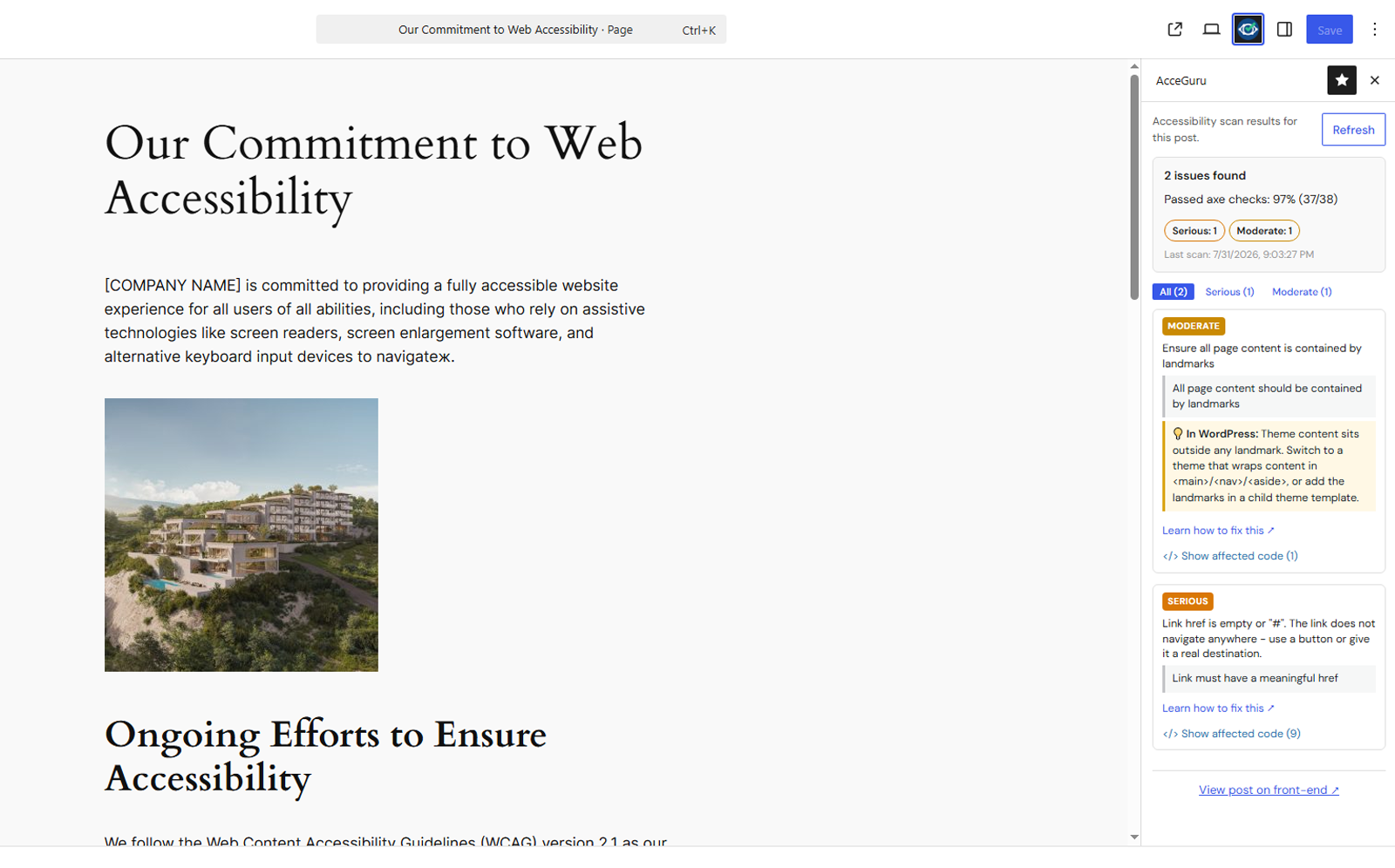
Per-page issue list in the Block Editor sidebar.
AcceGuru helps identify and address accessibility issues related to WCAG 2.0 / 2.1 / 2.2, Section 508 and EN 301 549. Automated testing cannot establish legal compliance or complete WCAG conformance; manual review is still required.
The axe-core scanner checks selected posts, pages and public custom post types from one dashboard. Saved results appear in the Block Editor sidebar and A11y post-list column, while the front-end overlay highlights affected elements on the live page.
AcceGuru also provides toggleable accessibility fixers, site-wide ignored rules, optional AI-generated alt text using your own provider key, and an accessibility statement generator.
Key features
- axe-core plus AcceGuru checks, filtered by the selected WCAG level and recommended-checks setting
- Dashboard scan with progress, pause/resume, failed-page retry, log export and content-type coverage
- Block Editor sidebar, A11y post-list column and front-end issue highlighter
- 13 independently toggleable fixers and site-wide ignored rules
- Optional single, bulk and on-upload AI alt-text generation
- Accessibility statement page, shortcode and optional footer link
- Translation-ready (text domain
acceguru)
Auto-fixers
Low-impact fixes are enabled on install. Appearance-changing fixes are off by default. Settings -> Fixers provides separate controls for skip links, focus outlines, language attributes, search and comment-form labels, empty searches, new-window and document-link labels, link underlines, video controls, positive tabindex, redundant titles and viewport scaling.
Standards coverage
- WCAG 2.0 / 2.1 / 2.2 – selectable levels A, AA and AAA
- Recommended checks – optional axe-core and AcceGuru checks that are not formal WCAG failures
- Section 508 and EN 301 549 – optional axe-core tagged rules
Accessibility requirements vary by jurisdiction. AcceGuru does not determine or guarantee legal compliance or complete WCAG conformance.
AI providers
AI alt text is optional and uses an API key supplied by the site owner. Supported providers are OpenAI, Anthropic, Google Gemini and Mistral. Keys are encrypted at rest using the WordPress authentication salt. See Privacy below for exactly when data is sent and for provider terms and privacy policies.
Privacy
AcceGuru does not phone home and has no analytics, telemetry, third-party trackers or remote license validation. The scanner runs in the browser and scan results stay on your site.
AI features are optional. When you request alt text for one image, run Bulk Alt Text, or enable automatic generation on upload, AcceGuru sends the image content and a text prompt from your server to the selected provider. Testing an API key sends only a short text prompt; Bulk Alt Text performs this test before processing images. When media is stored remotely or served through an offloaded-media/CDN URL, AcceGuru may first fetch that attachment URL. No provider request is made unless an administrator configures an AI provider and API key. Requests occur when an authorized user generates alt text, an administrator tests a key or starts bulk generation, or automatic generation on upload has been enabled.
Provider information:
- OpenAI – https://openai.com/ · https://openai.com/policies/services-agreement/ · https://openai.com/policies/privacy-policy/
- Anthropic – https://www.anthropic.com/ · https://www.anthropic.com/legal/commercial-terms · https://www.anthropic.com/legal/privacy
- Google Gemini – https://ai.google.dev/ · https://ai.google.dev/gemini-api/terms · https://policies.google.com/privacy
- Mistral – https://mistral.ai/ · https://mistral.ai/terms/ · https://legal.mistral.ai/terms/privacy-policy
Data stored in your database
wp_options– settings, ignored-rules list, encrypted AI API keys (underacceguru_*)wp_postmeta– per-post scan results and scan summary (under_acceguru_*)wp_optionstransients – dashboard aggregate cache (1 hour TTL)
On uninstall, data is preserved by default. The plugin replaces its shortcode on the tracked accessibility-statement page with a final static statement, so the published page remains readable without AcceGuru. Enable “Delete all data on uninstall” under Settings -> Rules, in the Advanced section, to remove plugin options, transients and post metadata and move the tracked statement page to the Trash. A page that no longer contains the AcceGuru shortcode is left untouched.
Credits
This plugin bundles axe-core (assets/js/axe.min.js, version 4.12.1), the accessibility testing engine by Deque Systems, licensed under the Mozilla Public License 2.0. Unminified source: https://github.com/dequelabs/axe-core/tree/v4.12.1
The bundled DM Sans and JetBrains Mono fonts are licensed under the SIL Open Font License 1.1. The full license is in assets/fonts/OFL.txt.