

Able Player, accessible HTML5 media player
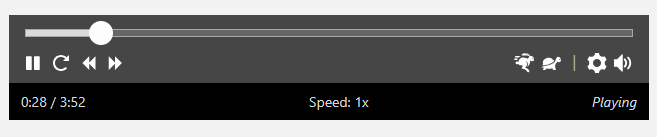
Able Player as an audio player
This plug-in uses Able Player, an open-source fully-accessible cross-browser HTML5 media player, to embed audio or video within your WordPress page.
Instructions for Use
There are currently three ways to add an Able Player instance to a WordPress site:
- Go to Settings > Able Player > Settings and enable the options to use Able Player for all video, audio, and playlists. Able Player will automatically replace MediaElement.js or the default WordPress video/audio blocks with Able Player.
- Go to Settings > Able Player > Shortcodes to generate an
[ableplayer]shortcode. - Enter or paste any valid HTML5 Able Player code into your web page. Full documentation is available on the Able Player project page on GitHub.
Using the media rewriting in option #1, Able Player will replace any audio or video block. Any tracks added to that block will be automatically handled, giving you support for all the standard Able Player features: captions, navigable transcripts, subtitles, chapters, and audio description.
Using option #2, you can create Able Player shortcodes that support most of the basic Able Player features, with support for Vimeo, YouTube, or local video.
Option #3 supports the full scope of Able Player features.
The [ableplayer] shortcode
The [ableplayer] shortcode supports the following attributes.
Required attributes (one of these)
youtube-id– 11-character YouTube ID or YouTube URL.vimeo-id– Vimeo ID or URL.media-id– An attachment ID for a media file in your WordPress media library or the URL to a hosted video.
Additional Player Content
captions– Attachment ID or URL to.vttcaptions file. Optional pipe separator for language code and label.subtitles– Attachment ID or URL to.vttsubtitles file. Optional pipe separator for language code and label.chapters– Attachment ID or URL to.vttchapters file. Optional pipe separator for language code and label.descriptions– Attachment ID or URL to.vttaudio descriptions file. Optional pipe separator for language code and label.youtube-desc-id– YouTube URL or ID of a described version of the videoyoutube-sign-src– YouTube URL or ID of a sign language interpreted accompanying videovimeo-desc-id– Vimeo URL or ID of a described version of the video
All captions, subtitles, chapters, and descriptions tracks must be in .vtt format. The shortcode only supports a single set of values for each type of data; to add multiple tracks of the same type you can use the Video block or add custom HTML.
Either an attachment ID or a URL for your track .vtt is required; you can optionally add a language code and a custom label:
captions="/path/to/file.vtt|es|Español"
By default, the language will be your WordPress installation language, with the labels “Captions”, “Subtitles”, “Chapters” or “Audio Description”.
Player Options
youtube-nocookie– “true” or “false” (use “true” to embed YouTube untracked, for added privacy)autoplay– “true” or “false” (default is “false”)loop– “true” or “false” (default is “false”)playsinline– “true” or “false” (default is “true”). By setting to “false”, some devices (e.g., iPhones) will play the video in their own media player rather than in Able Player.hidecontrols– “true” or “false” (default is “false”). Set to “true” to enable the player controls to fade away during playback. They will appear again if the user hovers over the player or pressing a key, and they are always accessible to screen reader users.poster– the URL of a poster image, displayed before the user presses Playwidth– a value in pixels (by default, the player will be sized to fit its container)height– a value in pixels (by default, the height of the player will be in proportion to the width)heading– The HTML heading level (1-6) of the visually hidden “Media Player” heading that precedes the player (for the benefit of screen reader users). If omitted, a heading level will be intelligently assigned based on context.speed– “animals” or “arrows” (default is “animals”)start– start time at which to start playing the media, in seconds. Some browsers do not support this.volume– “0” to “10” (default is “7” to avoid overpowering screen reader audio). Some browsers do not support this.seekinterval– number of seconds to forward/rewind with the Forward and Rewind buttons. If omitted, the interval will be intelligently assigned based on length of the video.nowplaying– “true” or “false” to include a “Selected Track” section within the media player (default is “false”).transcript-div– ID attribute of a target element that will contain the video transcriptid– a unique id for the player (if omitted, one will be automatically assigned)
Examples
Example 1
This example uses HTML to add an audio player to the page, with one source (an MP3 file).
html

  <audio id="audio1" preload="auto" data-able-player src="path_to_audio.mp3"></audio>
Example 2
This example uses HTML to add a video player to the page, with one source (an MP4 file) and four tracks (for captions, descriptions, and chapters in English; and subtitles in Spanish).
html

  <video id="able-player-1" data-able-player preload="auto" poster="path_to_image.jpg">

    <source type="video/mp4" src="path_to_video.mp4">

    <track kind="captions" src="path_to_captions.vtt" srclang="en" label="English">

    <track kind="subtitles" src="path_to_subtitles.vtt" srclang="es" label="Español">

    <track kind="descriptions" src="path_to_descriptions.vtt" srclang="en">

    <track kind="chapters" src="path_to_chapters.vtt" srclang="en">

  </video>
Example 3
This example uses the shortcode to add a video player to the page, with one source (an MP4 file) and four tracks (for captions, descriptions, and chapters in English; and subtitles in Spanish). All sources are fetched as WordPress media attachments.
html

  [ableplayer poster="21" media-id="24" captions="25|en|English" subtitles="26|es|Español" descriptions="27" chapters="28"]
Example 4
This example uses a shortcode to add a YouTube player to the page, with two versions of the video, one with audio description and the other without (the user can toggle between the two versions using the D button).
[ableplayer youtube-id="XXXXXXXXXXX" youtube-desc-id="YYYYYYYYYYY"]
Example 5
This example uses a shortcode to add a Vimeo player to the page, with two versions of the video, one with audio description and the other without (the user can toggle between the two versions using the D button).
[ableplayer vimeo-id="XXXXXXXXX" vimeo-desc-id="YYYYYYYYY"]
The Able Player plugin was originally created by Terrill Thompson.