


Abandoned Cart Recovery Suite for WooCommerce
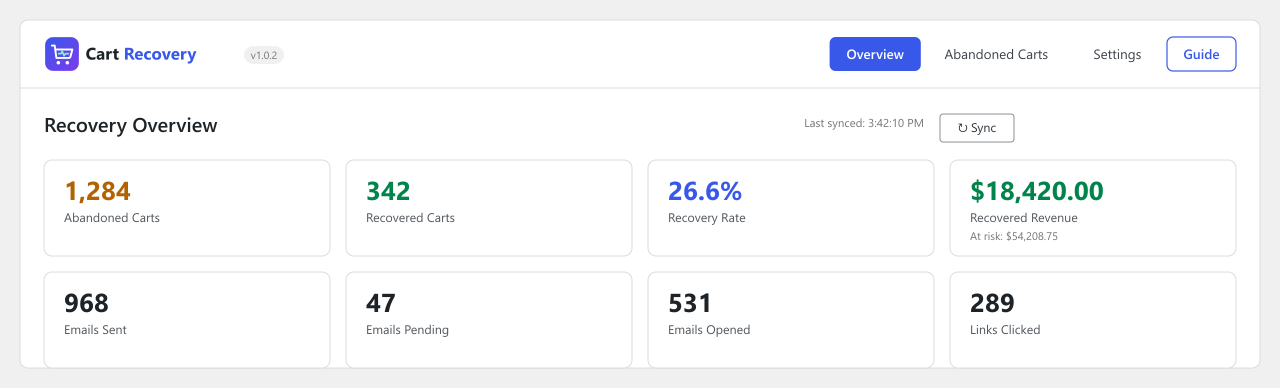
Recovery Overview dashboard — abandoned vs. recovered carts, recovery rate, and email performance at a glance.
Turn abandoned WooCommerce carts into recovered sales — without paying for a subscription service.
Most online shoppers who add something to their cart never finish checkout. Abandoned Cart Recovery Suite for WooCommerce captures those carts the moment a shopper enters an email address, then follows up automatically with a timed sequence of recovery emails — each containing a one-click link that restores the shopper’s exact cart — until the sale is won back or the shopper unsubscribes.
WooCommerce doesn’t recover abandoned carts on its own. This plugin fills that gap: cart tracking, automated recovery emails, one-click restore links, single-use discount coupons, and a recovery analytics dashboard, built specifically for WooCommerce stores. Everything runs on your own WordPress site — no external service, no monthly fee, no API key, and no customer data leaving your server.
How It Works
- A shopper adds products to their cart and starts checkout.
- The plugin captures the cart as soon as an email address is entered (guests) or automatically (logged-in customers).
- If the order isn’t completed within a set time (default: 15 minutes), the cart is marked abandoned.
- Up to three automated recovery emails go out at intervals you control — for example after 1 hour, 24 hours, and 72 hours.
- Each email contains a secure one-click restore link that rebuilds the shopper’s cart, including any coupon.
- When the order is placed, the cart is marked recovered, remaining reminders are cancelled, and the revenue shows up on your dashboard.
Key Features
- Automatic cart capture for both guest and logged-in shoppers
- Works with the WooCommerce Checkout Block and the classic checkout
- Configurable three-step recovery email sequence with custom delays and subject lines
- Secure one-click cart restore links, including products, variations, and quantities
- Auto-generated, single-use discount coupons restricted to the recipient’s email
- Email open and click tracking
- Built-in unsubscribe link on every reminder
- Recovery analytics dashboard — abandoned/recovered counts, recovery rate, lost vs. recovered revenue
- Cart browser with status filter and search by email or name
- Optional consent checkbox before tracking guest shoppers
- Automatic cleanup of old cart records after a retention period you choose
- Optional full data removal on uninstall
- Compatible with WooCommerce High-Performance Order Storage (HPOS)
- Fully translatable, with a .pot file included
Why Store Owners Use This Plugin
- Set it up once and recover lost revenue automatically
- A well-timed discount coupon often converts hesitant shoppers
- Cart and email data stay in your own WordPress database
- Lightweight — tracking scripts load only on cart and checkout pages
- Every feature described here, including the dashboard and coupon automation, is free
Who Is This For?
Any WooCommerce store that wants to reduce cart abandonment without adding a paid third-party service — physical products, digital downloads, subscriptions, or dropshipping shops alike. The plugin hooks directly into WooCommerce’s cart and checkout process, so it works with any properly coded theme or page builder.
Privacy & Data
Cart data (email address, first name, cart contents, cart total) is stored only in your own WordPress database. Nothing is sent to a third-party service.
- Optional consent checkbox before tracking guest shoppers
- Unsubscribe link on every email, stopping all future reminders for that address
- Configurable data retention with automatic cleanup
- Optional full data removal on uninstall
Template Customization
The recovery email template can be overridden from your theme — copy templates/emails/recovery-email.php to yourtheme/woocommerce/emails/recovery-email.php and customize it freely.