

410Gone Consent Manager for Google Consent Mode and GTM
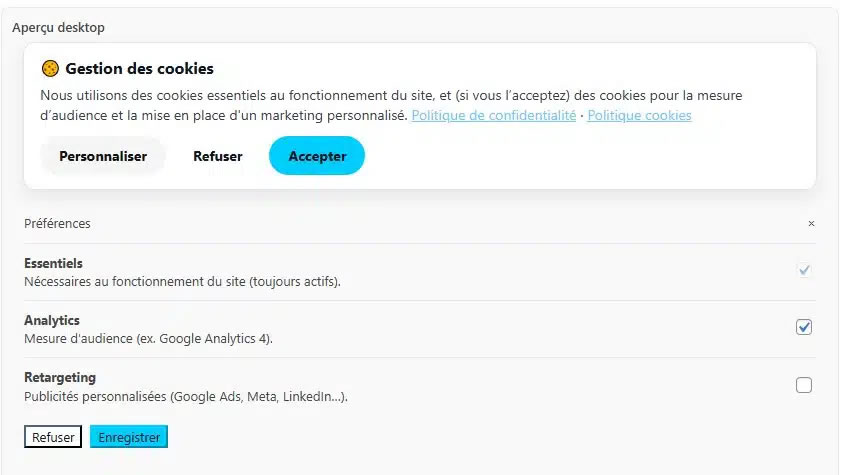
Plugin backend display a preview for the banner and the customize popin.
410Gone Consent Manager for Google Consent Mode and GTM is a lightweight CMP with a cookie banner, customization modal, and Google Consent Mode v2 + Google Tag Manager compatibility. It includes desktop/mobile previews in the admin, design and label settings, and multilingual support (Polylang, WPML, or via filter).
You can find the documentation in french for the plugin here : Official website for the consent managemet wordpress plugin(FR)
Key features
- Configurable banner and “Customize” modal (titles, texts, buttons, links, category titles/subtitles, named recipients and retention per category).
- Banner position: centered card, bottom banner, or full-width bar.
- Blocking overlay driven in pure CSS (immune to page cache and JS delay) with adjustable opacity, or non-blocking veil, or none.
- Strict Accept/Reject parity: configurable Reject button colors with a built-in contrast/parity guard.
- Enable/disable each proposed category (Analytics, Retargeting, Session recording).
- Keyboard focus trap (RGAA); Escape and the close button never count as consent.
- Google Consent Mode v2 with the seven signals, in basic or advanced mode (advanced is opt-in with an explicit legal warning).
- Tracking modes: all inclusive, hybrid, or GTM-only; the consent cookie is read in the
<head>in every mode so returning visitors are measured at load. - One-click GTM container export generated from the current settings (mergeable), plus a paused example for non-Google pixels.
- Server-side consent proof log (dedicated table, admin viewer, CSV export) without directly identifying data.
- Editable palette with color pickers and a live desktop/mobile preview in the admin (tabbed UI).
- Shortcode
[cmp410gone_manage_cookies]to display a “Manage my cookies” link. - Translation-ready for Polylang/WPML, with the
cmp410gone_translate_settingfilter for other multilingual plugins.
Design
- Enable/disable the CMP.
- Banner position: centered card, bottom banner, or full-width bar.
- Blocking overlay: active (choice required) / non-blocking veil / none, with an opacity slider (20–70%).
- Button colors — Accept, Reject (new, with a contrast/parity guard), Customize — plus background and text colors, via color pickers.
- Proposed categories: enable/disable Analytics, Retargeting and Session recording (a disabled category disappears from the modal and its consent is no longer requested).
- Keyboard focus trap (RGAA).
Labels
- Banner and modal titles/text; button labels (incl. the modal Reject-all button).
- Category titles and subtitles; named recipients and retention per category (CNIL requirement).
- Policy link labels and privacy/cookie policy URLs.
Tracking & configuration
- Choose the tracking mode (all inclusive, hybrid, GTM-only).
- Enter the GTM container ID (e.g.
GTM-XXXXXXX) and the GA4 measurement ID (e.g.G-XXXXXXXXXX). - Adjust
wait_for_update(ms) and whether to initialise the dataLayer. - Advanced Consent Mode (opt-in, with a legal warning): cookieless pings before consent,
ads_data_redaction=true,url_passthrough=false. - Download GTM container: exports a mergeable container tailored to the settings above (see the GTM section below).
Advanced
- Consent retention duration (days, default 180).
- Debug mode (console) and force display for testing.
Translations
- Save your texts in the main language.
- Polylang: go to Languages String translations, group CMP 410gone, and translate each key (
cmp410gone_banner_title,cmp410gone_btn_accept, etc.). - WPML: go to WPML String Translation, domain CMP 410gone, then translate the same keys.
- Other plugins: hook into the
cmp410gone_translate_settingfilter to provide custom translations.
Frontend usage
- The banner and modal are injected automatically (
wp_head,wp_footer). - The shortcode
[cmp410gone_manage_cookies label="Manage my cookies"]displays a management link. - Third-party scripts should be controlled via GTM to respect consent choices.
Consent categories & signals
The banner exposes three opt-in categories mapped to the seven Google Consent Mode v2 signals:
- Analytics (measurement)
analytics_storage. - Retargeting
ad_storage,ad_user_data,ad_personalization. - Session recording (Clarity, Hotjar…)
personalization_storage,functionality_storage. - Essentials are always on
security_storageis granted; every other signal defaults todenieduntil a choice is made.
GTM integration recipe (REQUIRED for non-Google tags)
Consent Mode only governs Google tags. For any non-Google pixel (Meta, Taboola, LinkedIn, Clarity, Hotjar…) you MUST prevent the tag from loading until consent is given — a “decorative” Consent Mode condition does not block anything. Apply this on every site using the CMP:
- Listen only to the single canonical dataLayer event
cmp410gone_consent_update(see below). Do NOT trigger tags onga4_after_consent(deprecated alias, kept for backward compatibility only). - On that event the CMP publishes booleans you must gate with:
cmp410gone_analytics(measurement, incl. session recording tools attached to analytics),cmp410gone_retargeting,cmp410gone_session(session recording / heatmaps).
- Each non-Google tag carries the consent condition of its category (e.g.
ad_storage+ad_personalizationfor retargeting) and its trigger adds an exception when the matching boolean isfalse. - Mandatory QA: in a partial-consent state, confirm there is no network request to the tracker’s domain.
Canonical event payload:
js

dataLayer.push({

  event: 'cmp410gone_consent_update',

  cmp410gone_analytics: true|false,

  cmp410gone_retargeting: true|false,

  cmp410gone_session: true|false,

  cmp410gone_consent_changed: true|false // true only when the choice was just made by the user

});
cmp410gone_consent_changed is `true` only when the update comes from a user action (accept/reject/save), and `false` on the init replay for a returning visitor. Combined with `cmp410gone_analytics`, it lets GTM re-send a GA4 `page_view` for the current page the instant a **new** visitor accepts (so the landing shows in GA4 real time without a refresh), without double-counting returning visitors.<h3>GTM container export</h3>The Tracking tab has a **Download GTM container** button that generates a mergeable container from your settings: a GA4 configuration tag on *All Pages* (consent `NOT_SET` in advanced mode, otherwise requiring `analytics_storage`), a Conversion Linker (url_passthrough off), the canonical `cmp410gone_consent_update` trigger, dataLayer variables and “granted” triggers for the enabled categories, a GA4 `page_view (post-consent)` tag (basic mode), and a paused example for non-Google pixels. No site-specific pixel is included — the integrator adds them from the example. In advanced mode the GA4 config already emits a cookieless page_view at load, so the post-consent page_view tag should be removed to avoid double-counting.<h3>Consent proof (server-side log)</h3>Every choice is logged server-side in a dedicated table (`{prefix}cmp410gone_consent_log`) to satisfy the CNIL/GDPR requirement to *demonstrate* consent. Stored data: timestamp, purposes version, and the choice — **no directly identifying data** (IP and User-Agent are only kept as salted SHA-256 hashes). View and export entries under *Settings → 🍪 Consent log*. Entries older than 3 years are pruned automatically. The table is kept on uninstall (proof retention) unless `CMP410GONE_DELETE_LOG_ON_UNINSTALL` is defined to `true`.<h3>External services</h3>This plugin can load Google Tag Manager when you provide a GTM Container ID in the settings.
- Service: Google Tag Manager (gtm.js and noscript iframe).
- Data sent: the GTM container ID and the consent state stored in the dataLayer.
- When: on page load, only if GTM is enabled in the plugin settings.
- Terms: https://marketingplatform.google.com/about/tag-manager/
- Privacy: https://policies.google.com/privacy
Troubleshooting
- If using JS optimization (e.g. WP Rocket), exclude
cmp.js/410gone-consent-managerfrom “Delay JavaScript execution”, then clear cache. - Enable debug mode to follow the consent flow in the console.
More information: https://www.410-gone.fr/blog/plugin-cmp-wordpress-gratuit-consent-mode-v2-gtm.html